Build Notes
Blogger to Hostinger: What Broke While Moving 70 Posts
The moment I clicked the WordPress administrator button in Hostinger, I landed on a familiar Blogger page saying that the page did not exist. The posts had already been imported. The new WordPress site was running. Yet my browser was still talking to the old server.
This is the migration record for Tech Trend Insight: 70 published posts moved from Blogger to WordPress on Hostinger, with the existing domain and article addresses preserved. It covers the problems we actually encountered, the changes that resolved them, and what was still pending after the server checks passed.
Migration checks recorded on November 7, 2026, Korea Standard Time. This account documents the technical cutover; it does not claim that every visitor had switched servers or that Google had finished reindexing the site.
Publication update: By the time this article was prepared for publication, the public domain reached WordPress in our publishing session and Hostinger’s administrator login worked. The earlier DNS and missing-page observations below describe the transition period. Google’s subsequent crawling and indexing remain separate checks.
The starting point: the posts were already in WordPress
By the time this stage began, the content import was complete. Reimporting everything would have risked creating duplicates, so the next job was an audit.
All 70 published posts were already assigned to AI Technical Articles. Modeling Lab and Gaming Lab were reserved for future work. Those categories did not need to become part of the article URLs.
The main requirement was to keep the existing address structure:
https://www.techtrendinsight.com/YYYY/MM/article-slug.htmlWe compared the imported posts with their stored Blogger source URLs and built a URL map. All 70 article paths matched. Keeping those paths meant readers could continue using their existing article links after the domain started reaching WordPress.
Before changing DNS, we exported the WordPress content and created a full Hostinger backup of the files and database. The original Blogger site was also retained.
Keeping the domain at Squarespace
The domain was registered with Squarespace. Moving the website to Hostinger did not require transferring the domain registration.
We kept the existing nameservers and edited the DNS records at Squarespace. The root domain’s A record was pointed to the IP address assigned to the Hostinger website, and the www CNAME was changed to point to the root domain. The old Blogger hosting A records were removed; the Google verification CNAME and Squarespace’s Domain Connect record were retained.
| Record | Destination after the change | New TTL |
|---|---|---|
A: @ |
The IP assigned to this Hostinger site | 300 seconds |
CNAME: www |
techtrendinsight.com |
300 seconds |
The server IP is specific to the hosting account. For another migration, the value needs to come from that website’s own Hostinger dashboard.
Problem 1: the domain still opened Blogger
After the DNS change, the authoritative DNS server and a public DNS resolver returned the new Hostinger destination. Ordinary browsing could still return a page served by Google’s Blogger infrastructure.
To separate the two results, we also tested the Hostinger origin directly using the real hostname and normal certificate validation. It returned WordPress. This gave us two different observations: the new server worked, while some connection paths still used the old DNS information.
The previous hosting records had a TTL of 14,400 seconds—four hours. Lowering the new records to 300 seconds did not erase copies of the old records that other systems had already cached. Four hours was a useful expectation based on the old TTL, not a guaranteed deadline for every visitor.
The practical response was to keep the new DNS configuration stable and allow the remaining caches to expire. Repeatedly changing the destination would have made the diagnosis harder. Google’s guidance for changing hosting without changing URLs also calls for testing the new infrastructure and monitoring traffic through the move.
Problem 2: Hostinger’s administrator button opened a Blogger error
Hostinger generated a temporary WordPress login URL on the public domain. In the browser that still reached Blogger, that URL produced Blogger’s missing-page message. Blogger had no matching WordPress login file to serve.
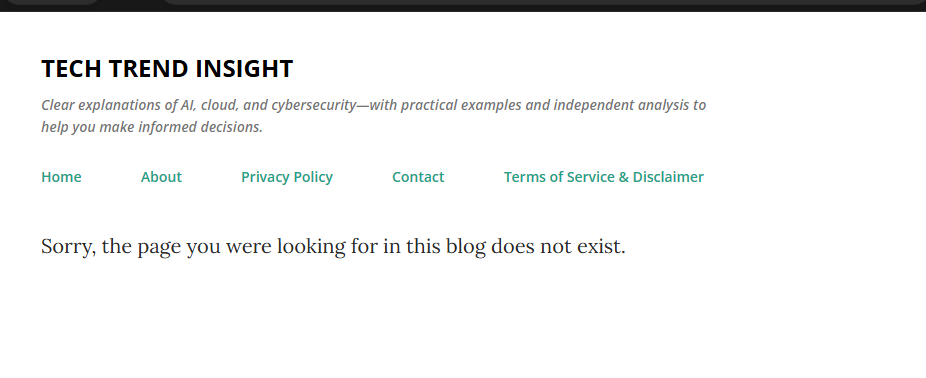
This was an important distinction. Reinstalling WordPress or importing the posts again would not have corrected the server that answered the request. We used Hostinger’s management tools for the remaining configuration while public-domain access was still inconsistent.
During that interval, we prepared this article as an offline draft. Once the public domain reached WordPress in our publishing session, a fresh administrator link from Hostinger successfully opened the dashboard. We could then upload the screenshots and move the draft into WordPress. A temporary login URL should not be treated as a permanent bookmark.
Problem 3: SSL was active, but the www address failed validation
The Hostinger dashboard showed an active SSL certificate. A direct HTTPS test of the root domain succeeded. The same test for www.techtrendinsight.com failed hostname validation.
Inspecting the certificate confirmed that it covered the root domain only. Since the existing public address used www, that missing coverage mattered.
After confirming the brief HTTPS interruption involved, we reinstalled Hostinger’s free SSL certificate. We then tested the www hostname again with certificate validation enabled. It returned a successful HTTP response from WordPress.
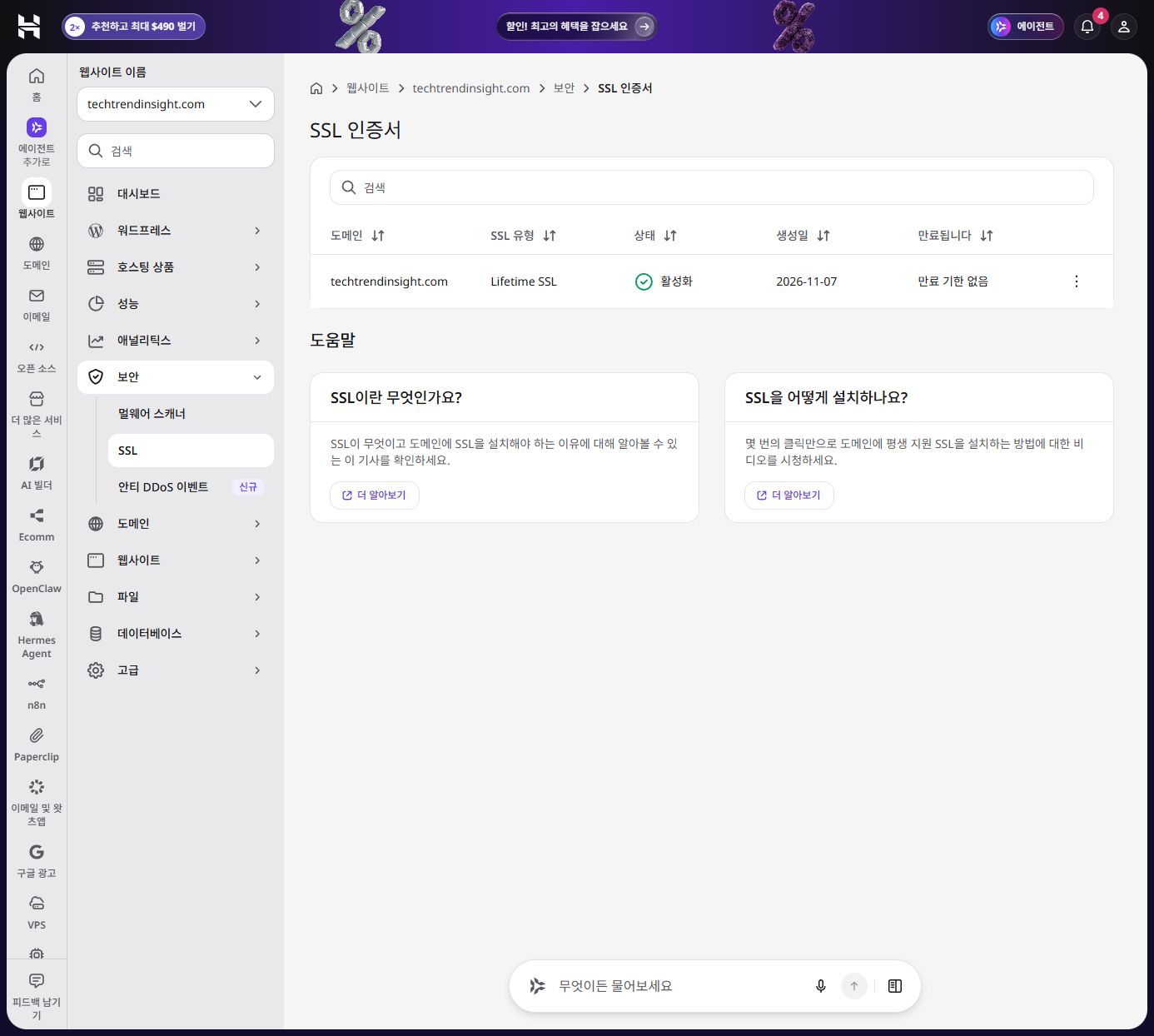
The lesson for me was to test each hostname that readers actually use. A dashboard status is useful, but the request to the intended hostname is the more direct check.
Problem 4: two article routes and the SEO URLs needed refreshing
The production audit found two old article addresses returning 404 responses. Other pages loaded, but their generated canonical URLs still used the domain without www.
We set WordPress’s home and site addresses to the existing https://www.techtrendinsight.com address, refreshed its rewrite rules, and reset the stale Yoast permalink cache so the SEO URLs could be rebuilt.
After that refresh, all 70 original article addresses returned HTTP 200 from the Hostinger origin. Each article’s canonical URL matched its existing www URL. This was a server-side verification result; it did not mean every browser’s DNS cache had already updated.
Problem 5: old mobile links returned 404
A clean article URL worked, but the same address with Blogger’s ?m=1 mobile parameter returned 404 in WordPress. Testing only the clean URLs would have missed this.
We added a server redirect for that legacy parameter. It sends the request to the same article path on the preferred HTTPS hostname, without the mobile query string.
/YYYY/MM/article-slug.html?m=1
    → 301 redirect
/YYYY/MM/article-slug.html
The tested mobile link then reached the correct article with HTTP 200. Our compatibility rule discards the query string on those mobile requests, so it also removes any other parameters attached to that particular request. That behavior should be considered if campaign tracking parameters matter to a different site.
Search Console: a successful sitemap was one milestone
The staging site had been kept out of search with a noindex setting. We removed that search block for production and checked that the articles allowed indexing.
The existing Search Console domain property and ownership verification were retained. We submitted the new Yoast sitemap index at /sitemap_index.xml. The old /sitemap.xml address redirected to the new index, so existing references to it still had a working destination.
Search Console initially displayed “Couldn’t fetch.” On a later check, it identified the file as a sitemap index and changed to Success. DNS propagation was still a plausible factor during that interval, but that status message alone did not identify the exact cause of the initial fetch failure.
At the captured check, the new index showed zero discovered pages. Separately, the post sitemap itself contained all 70 article URLs plus the homepage. A successful sitemap fetch and a completed indexing process are different results.
We did not submit a Change of Address request. The public domain and article URLs were being preserved, and Google explicitly excludes hosting changes with no visible URL changes from that tool. See Google’s Change of Address guidance.
What had passed—and what still needed time
| Check | Recorded result |
|---|---|
| Existing published article addresses | 70 of 70 returned HTTP 200 on Hostinger |
| Article canonical URLs | 70 of 70 matched their existing www addresses |
| Self-hosted article image URLs | 64 checked; all returned HTTP 200 |
| About, Contact, Privacy, and Terms pages | All four returned HTTP 200 |
| Legacy Blogger mobile link | 301 redirect to the same article without m=1 |
| Original Blogspot article address | Tested link redirected to the matching custom-domain URL |
| New sitemap index in Search Console | Success |
| Every visitor reaching WordPress | Still pending during these checks |
| Google recrawling and indexing the site | Still pending; no ranking or traffic outcome claimed |
These results describe the checks we performed. An HTTP 200 image check confirms that the file can be retrieved; it does not replace reviewing every image’s appearance. Likewise, preserved URLs and a working sitemap do not guarantee unchanged search rankings.
What I would do on the next migration
I would again begin with a complete URL list and a recoverable backup. I would prepare both hostname variants, test old mobile URLs alongside clean article URLs, and check the generated canonical tags before calling the technical cutover complete.
I would also describe progress more precisely: content imported, new server tested, DNS changed, and public access settled are separate milestones. During this move, calling the setup complete too early obscured the fact that the browser could still be reaching Blogger.
For ongoing publishing, WordPress is now the destination. The original Blogger site remains intact during validation, and its tested Blogspot link still redirects to the corresponding custom-domain article. The next checks are ordinary access after DNS settles, new 404 errors, and Search Console’s indexing reports.
Editorial note: This article was prepared with AI assistance from the migration records and actual screenshots, then checked against the recorded technical results. Account identities, email addresses, authentication links, and database access details are excluded.
Discussion