AI Technical Articles
Scribe v3 Explained: Words, Speakers and Live Turns
A fluent transcript can still be wrong in ways that matter. It can capture a sentence but assign it to the wrong speaker, mishandle a number or language switch, or, in a live application, decide that someone has finished speaking when they were only pausing.
ElevenLabs Scribe v3 makes those distinctions worth testing. This guide separates word recognition, speaker assignment, live turn completion, and the handling of names, numbers and languages, then shows how to check each against the audio.
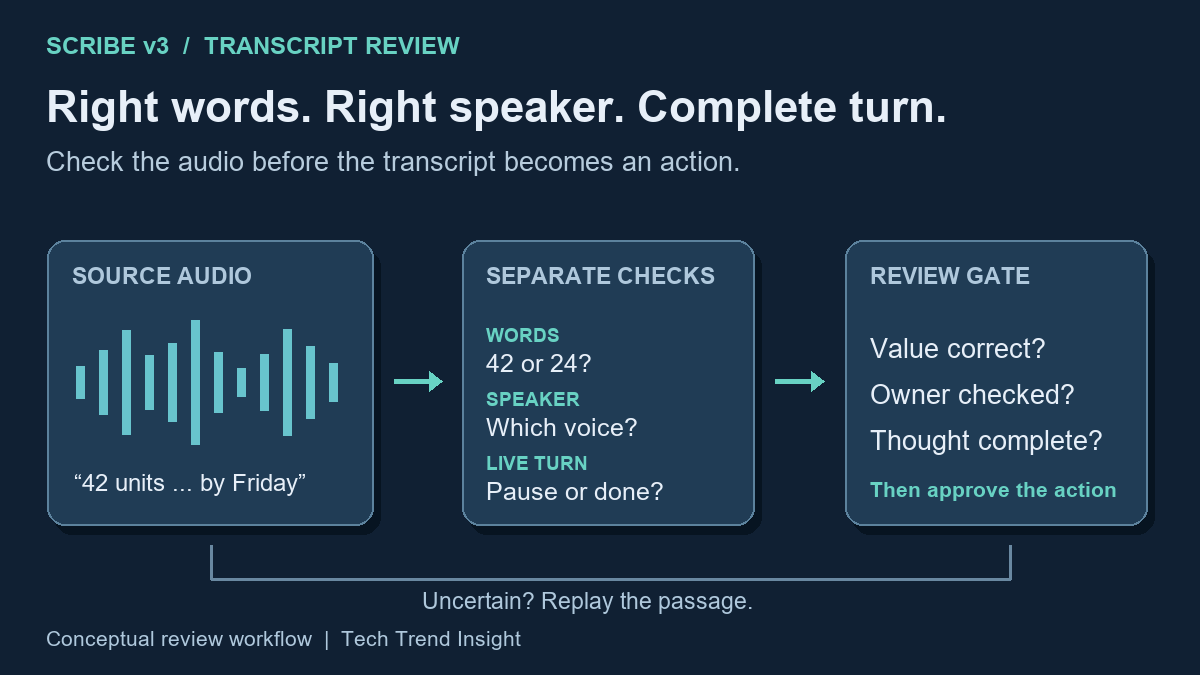
- Did it capture the words correctly?
- Did it assign them to the right speaker?
- For live transcription, did it correctly decide when the speaker finished?
- Did it represent numbers, languages, names, and specialist terms as intended?
ElevenLabs launched Scribe v3 for recorded audio and Scribe v3 Live for real-time audio on November 10, 2026. Both are available through ElevenAPI, while Scribe v3 Live is also available in ElevenAgents. See the official announcement.
Accuracy is more than getting the words right
Speech-to-text converts spoken audio into written words. A common measure is word error rate (WER), which counts substitutions, deletions, and insertions relative to a reference transcript. Lower WER is better.
Meetings introduce another problem: speaker diarization, or determining which portions of speech came from which speaker.
Those are separate tasks. A system could correctly transcribe:
“We approved 42 units.”
while assigning the sentence to the wrong person. The words would be correct, but meeting minutes based on that attribution could still be misleading.
Scribe v3 is designed for recorded audio and includes controls such as number formatting and language hints; ElevenLabs also emphasizes improved speaker labeling in the new model.
Consider a transcript containing:
“I approved 42 units for November 20,” attributed to Alex.
A consequential review should verify at least four things against the audio:
- Was “approved” actually spoken?
- Does the audio support assigning that voice to Alex?
- Was the quantity 42?
- Was November 20 the date stated?
A polished sentence cannot answer those questions by itself.
Live transcription has an additional problem: knowing when a turn is finished
Scribe v3 Live processes an incoming audio stream instead of an already completed recording. That adds a timing decision.
A live transcription application can commit text when it detects enough silence. A short threshold risks treating a thoughtful pause as the end of a turn; a longer threshold delays the response.
The commit-strategy guide describes three ways to finalize a transcript segment: a manual signal from the application, voice activity detection (VAD) using speech and silence, or Scribe v3 Live’s turn prediction using conversational context.
Set commit_strategy=turn_prediction explicitly to enable prediction; the current API reference lists manual as the default. Silence detection remains active in prediction mode, so a long pause can still finalize a segment. A committed segment is a processing boundary, not proof that the person has finished their thought.
For a test input such as “The code is A-17 … and the quantity is 42,” check whether the application waits for the quantity before triggering its next action. Keep the pause and the resulting commit time in the test record.
This becomes especially important when somebody pauses while reading an account number, date, product code, or other structured information. For a live application, test not only whether the words eventually appear but also whether the system commits the speaker’s turn before the information is complete.
Multilingual transcription is not translation
Language handling is another area where precise terminology matters.
ElevenLabs’ language guide states that Scribe does not translate: speech is transcribed in the language in which it is spoken. Its real-time API can use a primary language plus expected secondary languages, while Scribe v3 Live’s multilingual mode can follow language changes during a session, including switches in the middle of a sentence.
The documentation also identifies limitations. Background speech resembling another language can be transcribed, and short phrases are more susceptible to incorrect transcription in multilingual mode. At the time of the current documentation, the official software development kits (SDKs)—libraries that simplify API calls—do not support multilang_mode yet. To use it, developers must connect directly through the WebSocket API, which keeps a connection open to exchange streaming audio and results.
That makes bilingual conversation a better test than a demonstration in which one person reads clean sentences in one language.
What the benchmark claims actually establish
In its launch evaluation, ElevenLabs reports 27% lower word error rate for Scribe v3 versus v2, averaged across 102 languages on an internal version of FLEURS. That benchmark uses short, clean read speech. The company reports 17% fewer diarization errors on separate recordings with at least three speakers.
The Live model’s headline 43% reduction is in semantic word error rate, which focuses on meaning-changing errors. Its standard WER reduction is 31%, versus v2 Realtime. The company scored languages separately and averaged them equally.
These are vendor results with specific scoring conditions. A relative 27% error reduction would turn 100 errors into 73 on a comparable test; it does not mean a 27-percentage-point accuracy gain. Clean read speech also cannot establish performance on your overlapping meeting voices or specialist vocabulary. Test those conditions separately.
A practical test for a recorded meeting
Suppose you have a 45-minute planning meeting with three participants. Most of it is English, one participant occasionally switches to Korean, and the discussion includes terms such as “Project Atlas,” “SKU A-17,” “42 units,” and “November 20.”
Because the complete recording already exists, start with Scribe v3, not the real-time Scribe v3 Live model.
Configure the transcription around the information that is important to preserve:
- Specify the expected language or languages where the API options support it.
- Choose the required number formatting.
- Supply important project names, product codes, and specialist vocabulary using the available terminology controls.
- Enable speaker labeling when attribution matters.
- Retain timestamps so questionable passages can be located in the source audio.
- Check every consequential name, quantity, date, identifier, and speaker assignment against the recording before turning the transcript into minutes or tasks.
The objective is not merely readable prose. It is a transcript whose important claims can be traced back to the audio.
Speaker labels also deserve a specific warning: diarization answers who spoke when within the recording. A label in a machine transcript should not, by itself, be treated as independent verification of a person’s real-world identity.
Test the errors that matter in your workflow
A representative trial is more informative than a polished demo.
Use at least one relatively clean recording and one difficult recording containing interruptions, multiple speakers, proper nouns, and spoken numbers. Produce a manually checked reference for representative passages, then record different failures separately:
- Word errors: inserted, deleted, or substituted words.
- Speaker errors: speech assigned to the wrong speaker.
- Critical-value errors: incorrect names, dates, quantities, identifiers, or domain terminology.
- Live turn errors: for Scribe v3 Live, cases where the application commits a speaker’s turn too early.
This separation matters. Two systems can have similar overall word accuracy while behaving very differently on quantities or speaker attribution.
Keep the raw machine transcript alongside any automatically edited or normalized version. Otherwise later cleanup can hide what the transcription model originally produced and make failures harder to diagnose.
For the hypothetical planning meeting, keep a small error log: audio timestamp; what was actually said; machine output; speaker label; correction needed. If “42” becomes “forty-two,” the value may be intact. If “42” becomes “24,” the decision changes. If the words are right but attributed to the wrong participant, fix attribution before assigning the task.
Choose acceptance rules before comparing models. For example, every quantity, deadline and task owner in approved minutes could require an audio check, while filler-word differences do not. Record review time as well as error counts: a cheaper transcript may cost more to correct.
Check cost and deployment requirements separately
Transcription quality is only one part of a production decision.
As of November 12, 2026, the official ElevenLabs API pricing page lists Scribe v3 at $0.20 per hour and Scribe v3 Live at $0.22 per hour. These are the displayed base rates, excluding taxes. Check your billing arrangement and optional features before budgeting. The realtime API reference, for example, lists a 20% premium for keyterm prompting.
For applications subject to privacy, retention, residency, or regulatory requirements, verify those requirements against the current ElevenLabs deployment and data-handling documentation before uploading real recordings. A transcription accuracy test does not establish that a configuration is appropriate for sensitive data.
The transcript still needs an evidence trail
The useful question is which errors your workflow can tolerate and which must send a reviewer back to the recording. Preserve the source audio and timestamps under your retention rules, check consequential passages, and only then turn the transcript into approved minutes or actions. Fluent text makes review easier; it cannot replace that check.