AI News
Gemini Decisions API: Fast Choices, Confidence Scores and Human Review
Gemini Decisions API is designed for a question with a defined set of answers: which queue should receive this request, is a condition present, or how does an input score against a rubric? Its useful output is a choice together with uncertainty your application can handle.
Scope: Gemini Decision 1 through the Gemini API / Google AI Studio
Read the official announcement ↗
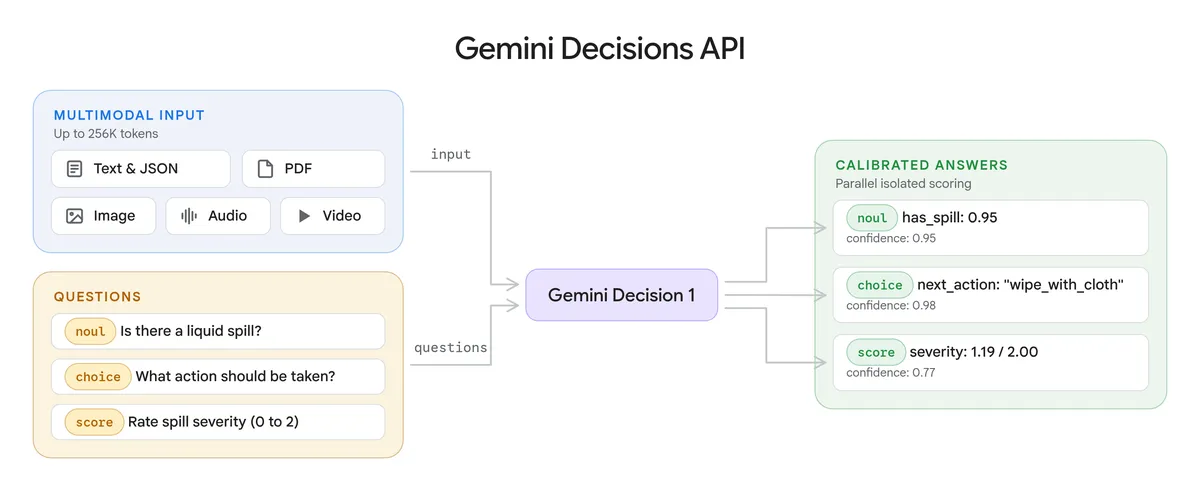
One input, several bounded questions
Google’s announcement introduces gemini-decision-1 with yes/no checks, multiple-choice selection and ordered rubric scoring. A request can ask up to 1,000 independent questions about shared input, including text, images, audio, video or PDFs. Instead of composing a long explanation, the endpoint scores the candidate answers.
This changes the design question for a developer. A chatbot may be useful when a person wants to explore a problem. A bounded decision is useful when software already knows the actions it can take and needs help choosing among them. Defining those options well becomes part of the application, rather than an instruction buried in a conversational prompt.
Read the spill example as three different judgments
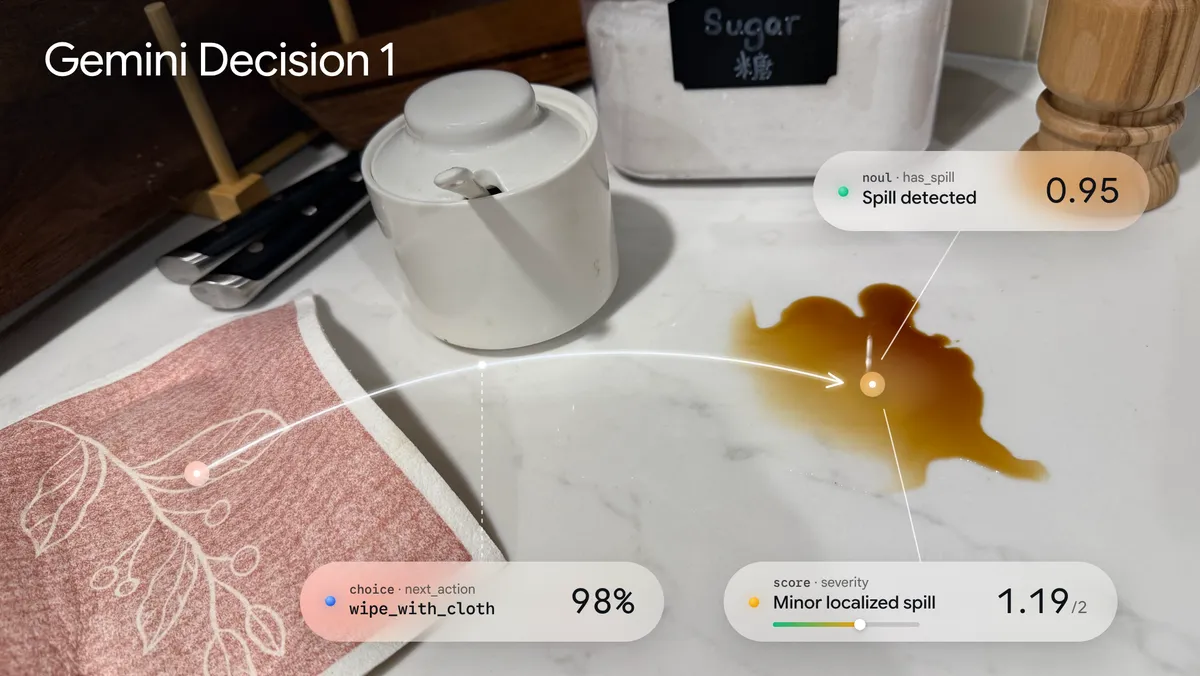
The image makes the distinction concrete. “Is there a spill?” concerns a visible condition. “What should happen next?” depends on the available actions. “How severe is it?” depends on an ordered scale. A good application should preserve those distinctions: a visible puddle does not tell you whether a cleaner is available or whether someone has already dealt with it.
The overlay is therefore a useful explanation of the interface, rather than proof that every similar scene will be classified correctly. An input outside the choices you anticipated can still receive a confident-looking answer. Include a review route and test what happens when the input is incomplete, contradictory or genuinely unfamiliar.
A practical design: route the uncertain case
Illustrative workflow, not a run we performed: a support service offers “billing,” “delivery” and “human review.” A message says, “The parcel never arrived, but I was charged twice.” The team should decide whether that belongs to two workflows, one priority queue or a reviewer before treating the API’s winner as a business decision.
| Stage | Design choice | What to record |
|---|---|---|
| Define the options | Write criteria that distinguish billing and delivery; retain a review path. | The criteria version and expected route. |
| Evaluate the input | Read the chosen option and its confidence together. | The input, option probabilities and returned model ID. |
| Act or defer | Send ambiguous or conflicting cases to a person. | The eventual correct route and any override. |
A threshold such as 0.8 would be a team policy, not a guarantee supplied by the number itself. Choose it using labeled examples that resemble real traffic, and compare how often the system is confidently wrong with how often it unnecessarily asks for help. Keep a held-out set so tuning the threshold does not become memorizing the same handful of examples.
Crucially, classification and permission are separate checks. A returned “refund” label would not establish that a customer is eligible or authorize a payment. Put account validation, limits and approval rules in the application. This is also the boundary discussed in our OpenAI Decisions API explainer; the Google endpoint covered here is a different product.
Access, cost and what the speed claim means
Google states a rate of $0.10 per million input tokens, with no output-token charge, and a no-cost prototyping tier. The shared input is billed once per request; question instructions and criteria still add tokens. At the stated paid rate, 20,000 input tokens would cost $0.002 before other application costs. That arithmetic is an estimate, not a receipt from our account.
The AI Studio entry point requires applicable account access and an API key for integration. Check its current quotas and availability before choosing a production design. Google describes Google Cloud support as forthcoming in this announcement, so do not assume every Cloud integration is already available.
Its reported latency should also be read with the benchmark’s input sizes and conditions. Network distance, media size and your surrounding workflow add time. For a prospective rollout, measure end-to-end latency alongside mistakes and review volume, rather than optimizing for the fastest isolated call.
What to try first
Start with a small, reversible routing task and examples containing missing information. Capture the criteria and the result together so a reviewer can explain why a route changed. Google links public demonstrations and SDK documentation from its announcement; those are better starting points than treating an illustrated score as your own accuracy estimate.
Reviewed November 15, 2026. Discovery lead: JoCoding’s November 15 IT NEWS briefing. We read the available transcript and independently checked the primary sources. The images are Google’s published examples. We did not run API inference or independently reproduce Google’s benchmarks.