AI News
MiniMax H3-Image Explained: 16 MP Editing and Who Can Use It
Give MiniMax H3-Image a photo of a moka pot and a second photo of its parts, and you can ask for a blueprint that uses the first for the shape and the second for the assembly. That distinction is what makes this still-image model interesting. A designer can tell it which reference should govern which part of the picture, then choose a canvas wide enough for the finished layout. See MiniMax’s two inputs and finished poster.
MiniMax announced H3-Image on November 11. Its November 26 H3 Family update clarified the speed headline: the company says its Highspeed mode can produce a 4K image in under ten seconds at its fastest. That figure is MiniMax’s measurement. A developer running the public weights on different hardware has a separate performance question. Release announcement · November 26 update.
What does 16 MP buy you after a crop?
A 4,096 × 4,096 square and a 6,272 × 2,688 panorama both contain roughly 16.8 million pixels. The panorama spends more of them on width. That makes it a useful choice for a landscape banner, but it leaves fewer pixels around a subject you want to crop for a square product tile.
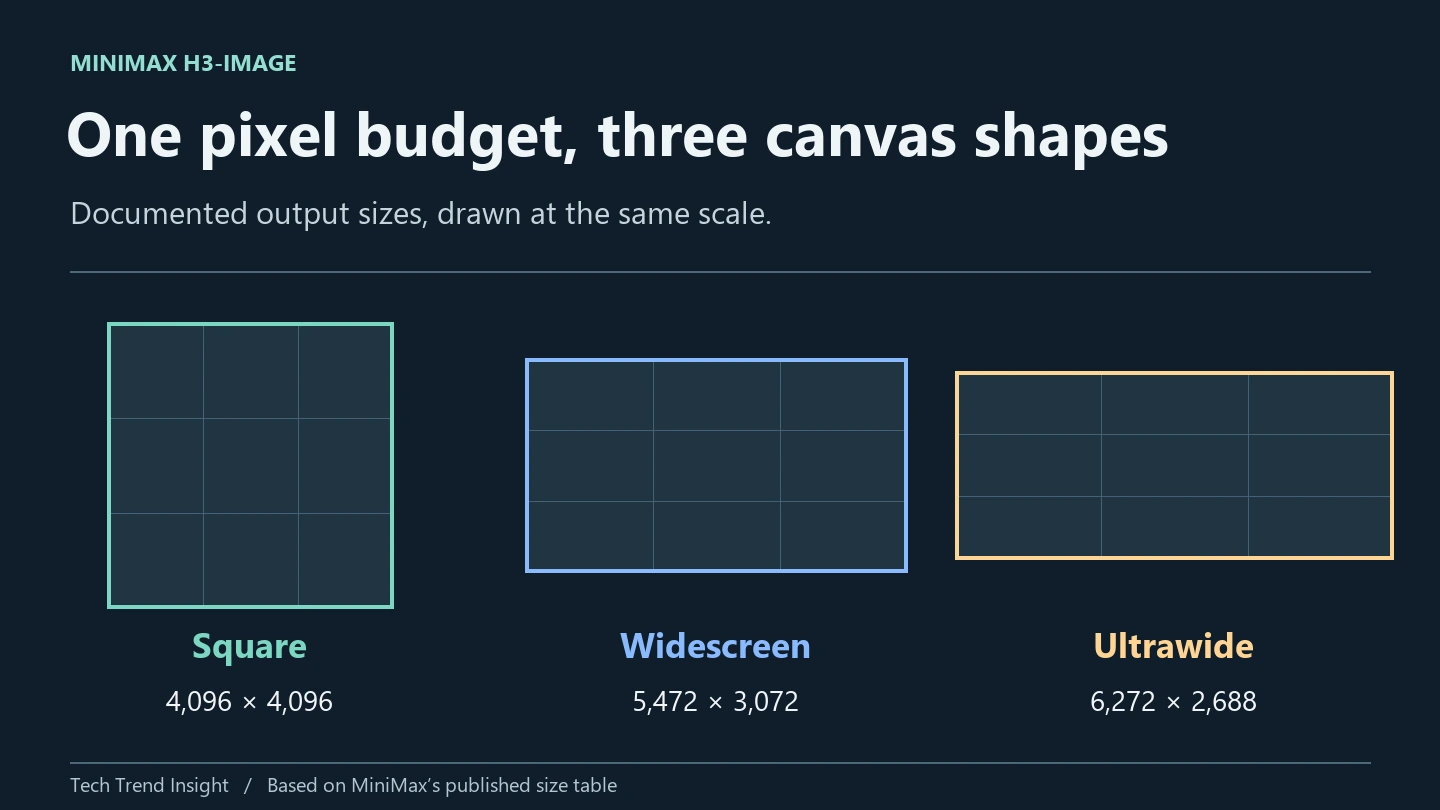
We checked the dimensions with a small Python calculation. For the panorama, the largest square you can cut out is 2,688 × 2,688, or 7.23 MP. It retains 42.9% of the original pixels. If both a panorama and a tightly framed square are deliverables, a second composition gives you more room for small labels and off-center subjects.
width, height = 6272, 2688
square_pixels = min(width, height) ** 2
print(f"{square_pixels / 1e6:.2f} MP")
print(f"{100 * square_pixels / (width * height):.1f}%")
# 7.23 MP
# 42.9%
How to read the two-reference editing demo
Open the moka-pot example and compare the inputs before you look at the output. The assembled pot supplies the eight-sided silhouette and handle. The parts reference explains what sits between the two chambers. MiniMax’s prompt assigns those roles explicitly, then asks for an exploded view on the left and a cross-section on the right. An editor reviewing the result can check three things separately: whether it still looks like the same pot, whether the components appear in a sensible order, and whether the small annotations are readable at publication size. A generated dimension line still needs a measurement behind it before it belongs in a technical manual. Open the official side-by-side and expand its prompt.
The Python editing client explains how the references reach the model. It accepts repeated --image arguments and sends the files in that order. The first file is Picture 1 in the prompt. If you swap the files but keep the instructions, the words “Picture 1” now point to a different object. That’s a useful first check when a multi-image edit borrows the wrong detail. For a different kind of edit, MiniMax also publishes a comparison of a podcast photo and two edits in which the hosts change gesture. Inspect the client’s reference ordering · View the creator’s podcast comparison.

Can you run the open weights locally?
Check the license before budgeting for GPUs. The published community license excludes South Korea, the United States, the United Kingdom and the European Union from its territorial grant. MiniMax invites people in those locations to contact it about a license for deployment. The model card lists hosted options separately. For a team planning a Korean deployment, confirming the applicable permission with MiniMax comes before choosing an inference server. Read the community license, sections I, II and V · See the official model card.
For deployments covered by the license, MiniMax’s repository estimates about 135 GB of downloads for the original checkpoint plus text encoder used by SGLang or vLLM-Omni. Download size measures storage. GPU memory and latency depend on the serving configuration. Our local check above covers the crop arithmetic; the visual editing examples and speed figures come from MiniMax. MiniMax’s deployment guide.
JoCoding covered H3-Image at 23:35 in its November news briefing. For a comparison with editing inside a chat interface, see our coverage of ChatGPT’s image controls. Watch the JoCoding segment · ChatGPT Images 2.6 editing controls.