AI News
Adobe’s Local MCP Preview: Agents That Keep Creative Files Editable
Adobe’s local MCP preview is about where an agent makes its changes: inside native creative project files that remain editable. For a designer or editor, that could matter more than receiving a polished export that is difficult to revise.
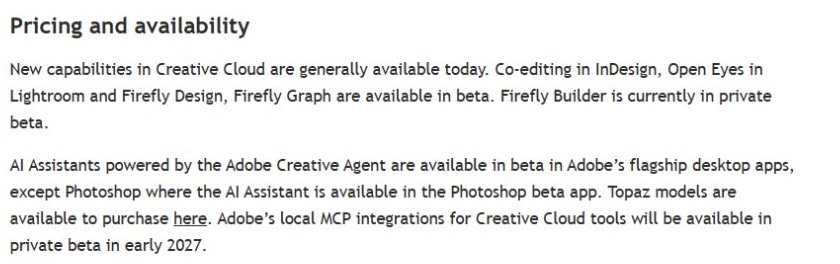
Scope: Preview; Adobe schedules a private beta for early 2027
Read the official announcement ↗
Why editable structure matters
Imagine changing a poster’s date after an initial design is approved. If the date remains a named text layer, a person can correct it, inspect the type and export another version. If the entire poster is a flattened image, the same request may require reconstructing content and checking that nearby artwork did not change.
The distinction applies across media. A video timeline contains clips and timing; a composition contains layers, properties and expressions. Those structures let a reviewer inspect how the result was made and alter one part without rebuilding everything. An agent that works on those structures can potentially fit into an existing production process more naturally than a separate image generator.
What Adobe actually announced
The Creative Cloud announcement names Photoshop, Illustrator, Premiere and After Effects for the local MCP preview. It describes third-party agents changing native files on the user’s computer while layers, sequences and compositions remain editable.
That preview sits alongside other announcements, including Adobe’s own Creative Agent and application features. These should not be collapsed into a single availability claim. Seeing a Creative Agent demonstration does not prove that an outside agent can already use the local MCP integration in an ordinary account.
| Term | What it refers to here | What to verify |
|---|---|---|
| Local MCP preview | A proposed connection for third-party agents to work with native creative files. | Actual beta access, supported versions and exposed operations. |
| Creative Agent / AI Assistant | Adobe’s own agentic features within its products. | The specific application, feature and beta status. |
| Generated media | An image, video or other asset produced by a model. | Whether the delivered result preserves editable project structure. |
MCP is the connection, not the whole system
The official MCP introduction describes a standard for connecting AI applications to tools and data. It does not make a tool’s behavior, permissions or supported file formats identical across every server. The integration’s exposed operations still determine what an agent can do.
Likewise, “local” should not be read as a complete statement about every data flow. The creative application may operate on a local project while the chosen AI service uses remote inference. Before processing a confidential client file, inspect the client and integration documentation for which data is sent where. This is an implementation question to verify, not an assumption established by the protocol’s name.
A visible error can be more useful than a clean export
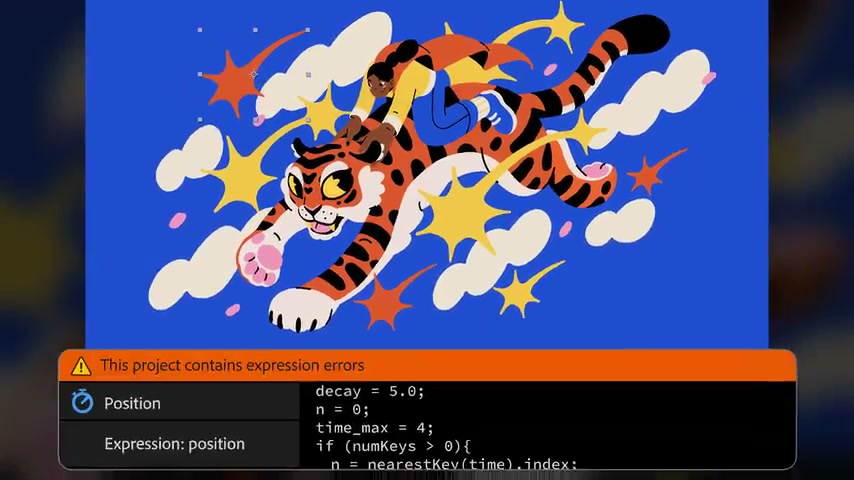
The expression-error scene is a helpful reminder of what a reviewer needs. A final frame may look wrong, but an editable project can expose the property and code associated with the problem. An agent’s useful contribution would be a correction that preserves the intended motion and does not change unrelated parts of the composition.
A good acceptance check therefore has two parts: inspect the changed structure and inspect the rendered result. Renaming the correct layer is not enough if the wrong composition was edited. Producing a plausible frame is not enough if the project can no longer be revised or exported reliably.
A sensible first evaluation when access arrives
Use a duplicate of a small owned project with a known result. Ask for one constrained change, such as updating one date while preserving typography, layer order and export dimensions. Save the original, inspect the changed objects and render the deliverable. Confirm that undo or version recovery behaves as expected before using a valuable project.
This is a proposed evaluation, not installation instructions for a feature we have used. Adobe’s detailed announcement schedules the local MCP integrations for private beta in early 2027. That is a forthcoming limited rollout, not general availability today. Check Adobe’s current access instructions rather than installing an unrelated third-party project merely because it has “Photoshop MCP” in its name.
Costs and the handoff still matter
Application access, agent usage and any generative service charges can be separate. A working protocol connection does not include all of those services automatically. The practical value is the quality of the handoff: can a human inspect the change, keep editing and deliver the result with confidence?
For a different example of work staying editable beside an AI conversation, see our Claude workspace explainer. Adobe’s original Creative Cloud overview is linked externally ↗; no video playback is hosted here.
Reviewed November 15, 2026. Discovery lead: JoCoding’s November 15 IT NEWS briefing. Product claims were checked against primary sources. The visuals are an actual capture of Adobe’s public availability notice and a still from its official Creative Cloud overview. We did not install or test the local integration.