Code Lab
AFFiNE Explained: How a Bookmark Fits a Document and a Canvas
CODE LAB · PROJECT SPOTLIGHT
AFFiNE TypeScript · MIT
A bookmark with more than one presentation.
Project preview · toeverything/AFFiNE
Paste a research link into a page and you may want a compact citation. Put the same link on a planning board and a visual card makes more sense. AFFiNE brings documents and an open canvas into one workspace. Its BlockSuite bookmark model shows how these presentations can share a typed representation.
On November 24, 2026, GitHub Trending showed 593 stars gained today. GitHub Trending
A bookmark with more than one presentation
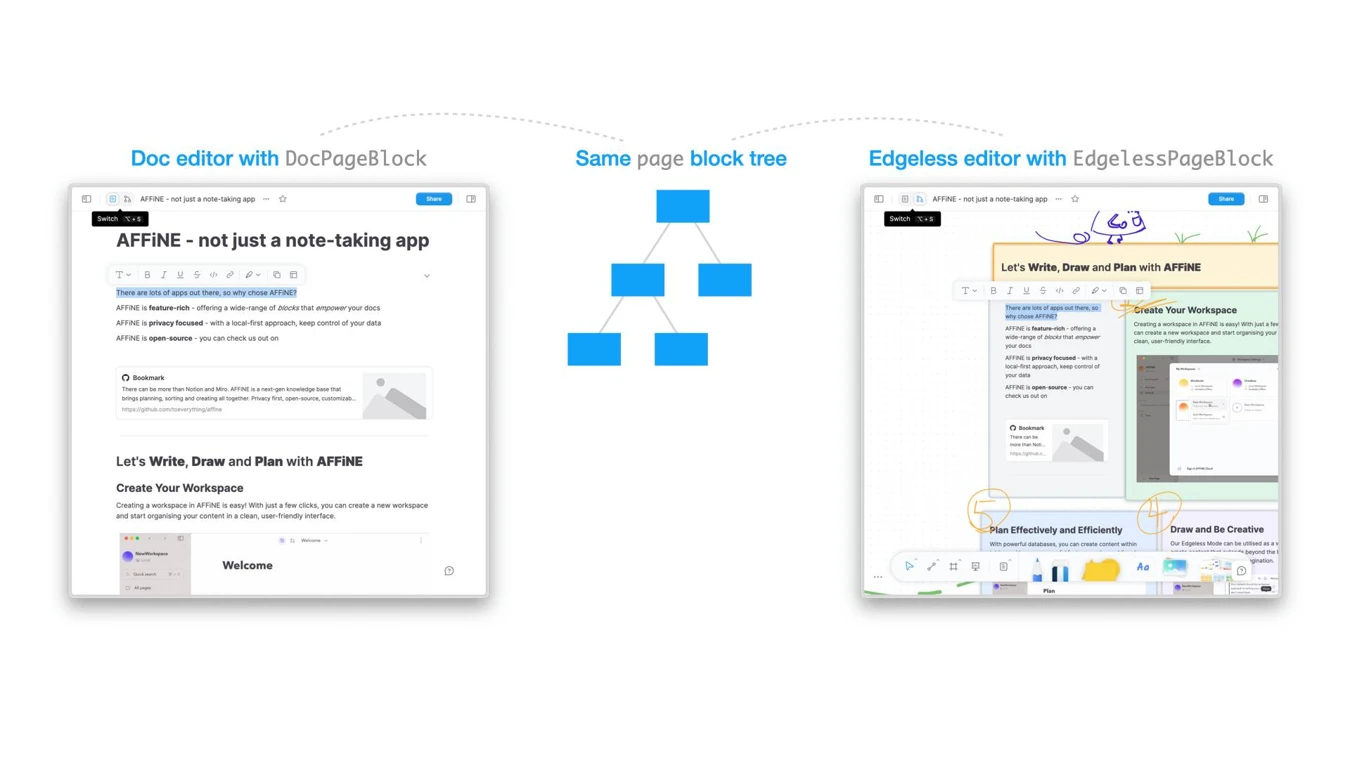

The BlockSuite project illustrates writing, mapping ideas and explaining a result across its editors. Look at how a linear reading order gives way to spatial arrangement. The editor needs to preserve the destination of a link as its presentation changes.
Inside bookmark-model.ts
BookmarkStyles declares five display options. TypeScript derives the allowed style values from that list. The block also carries a URL, a nullable caption and an optional comments map. LinkPreviewData adds preview fields, while graphics properties bring in canvas information. Below the excerpt, the defaults set the preview title and image to null, so a bookmark can exist before its preview arrives.
Source credit · toeverything/AFFiNE contributors. MIT license and notices.
Try the same link in two views
Create a scratch page and paste a public documentation URL. Give the card a caption, change its style, then reopen the workspace. Check the destination, caption and preview separately. If the preview image disappears while the URL still opens, you have narrowed the problem to preview data or rendering. A screenshot alone makes those cases hard to distinguish.
Developers extending a card should inspect the model defaults as well as the renderer. Older documents may lack preview metadata. The repository lists different licensing terms for some backend directories. The BlockSuite excerpt shown here falls under the repository’s MIT terms.
Build a bookmark before its preview arrives


A reader can paste a URL while the destination site is slow to return metadata. The link should still open, and the reader should be able to add a caption. This small JavaScript display function uses fields from the BlockSuite model above. It demonstrates one possible fallback policy for your own renderer.
JavaScript · worked example
const card = {
  url: "https://example.org/notes", style: "horizontal",
  title: null, image: null, caption: "Reading for Friday"
};
function display(block) {
  return [block.style, block.title ?? block.url, block.caption];
}
const preview = { ...card, title: "Field notes" };
const citation = { ...preview, style: "citation" };
for (const version of [card, preview, citation]) {
  console.log(display(version).join(" | "));
}
console.log("Stable destination:", citation.url === card.url);
Output from our run
horizontal | https://example.org/notes | Reading for Friday
horizontal | Field notes | Reading for Friday
citation | Field notes | Reading for Friday
Stable destination: true
Read the middle column from top to bottom. It starts as the URL, becomes the preview title, and keeps that title when the presentation switches to citation. The caption survives every transition. This is also a useful regression case for an editor: type a caption while the preview request is pending, then deliver only the fetched title. Replacing the entire block with the preview response could erase the caption or the selected style.