AI News
Google Meet Expands Speech Translation to 63 Languages
A multilingual meeting becomes more practical when each listener can choose a language. Google Meet’s expansion also has plan, time and call-type limits worth checking first.
Scope: Workspace feature rollout
Read the official source ↗
What changed
Google announced speech translation across 63 languages, with automatic language detection and individual listener controls. Translated captions can match the translated audio. The update covers web and mobile, while Meet hardware can listen to translated remote speech but does not translate speech originating from the room device.
Who can use it
The October 22 announcement lists eligible Workspace and Google AI plans. Scheduled Release rollout starts November 2 and can take up to 15 days. Base eligible Workspace and AI Pro plans have a 90-minute meeting limit; higher access tiers extend that to eight hours. Translation is unavailable in recordings, live streams, client-side encrypted meetings and certain other call modes. Eligibility and regional or age restrictions still apply.
A useful meeting check
Our suggested trial uses a low-stakes call and a few agreed sentences containing names, dates and numbers. Have each participant confirm the meaning before using the feature for an important discussion. Also check whether the organizer’s plan and the actual call type qualify. The setup check below shows what we could activate in our own session; it does not benchmark spoken translation.
Our setup check: Korean listening translation in a real meeting
We created a private, one-person Meet session on November 15 with the camera and microphone off. In Captions and translation → Speech translation, the language selector contained 63 entries, including Korean. We selected Korean and enabled listening translation; the call controls then displayed Translating to Korean.
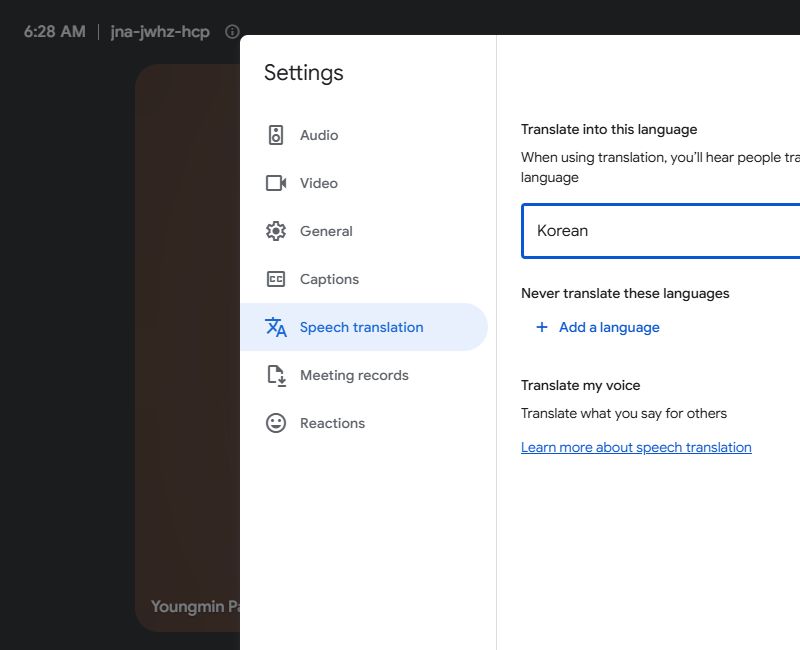

The interface separately asked whether to translate our own voice for others; we chose Not now. Selecting a listening language and allowing your voice to be translated are separate controls. We restored English, turned translation off and ended the test meeting afterward.
What this verifies: the settings, language list and activation path were available on the tested account. No second speaker or audio sample was used, so this check does not measure translation accuracy, latency, voice quality or performance across all 63 languages.
Three settings that should not be confused
| Control | What to check | Our test coverage |
|---|---|---|
| Listening language | The language you want to hear | Korean was selected and the active control displayed it. |
| Translate your own voice | Whether others receive a translated version of your speech | We chose Not now; our own voice was not tested. |
| Captions, transcript and recording | What is shown or retained after the meeting | We did not make a recording or test a multilingual transcript. |
Do not assume the meeting record matches what everyone heard
Google’s speech-translation help page distinguishes live translation from recording and note-taking behavior. Transcripts and Take notes use their configured meeting language rather than preserving every listener’s translated experience. Before relying on an after-meeting record, check those settings separately.
Consider a project review with one listener hearing Korean and another hearing English. Agreement during the call still needs a shared written record of the delivery date, price and owner. Ask participants to confirm those items explicitly instead of assuming that a fluent-sounding translation captured every detail. This is a proposed workflow safeguard, not a finding from our silent test call.
A more meaningful next test
Use two consenting speakers and a prepared script containing a name, a date, a number and a correction. Compare the translated meaning with the original sentence and note whether the correction arrives in time to avoid confusion. Include an ordinary pause and an interruption. This would test aspects that a language-selector screenshot cannot establish.
If the option is missing, begin with the organizer’s eligibility, the call type and the account’s rollout status before troubleshooting the microphone. In our session the camera and microphone were off while the listening-language control remained available; enabling the control alone did not provide audio evidence. The screenshots are therefore useful setup guidance, with the limits kept visible.
Read the source: Google Workspace.
Reviewed November 15, 2026. Discovery credit: JoCoding’s November 8 IT NEWS briefing. This brief independently checks the linked primary source and distinguishes the announcement date from this article’s publication date.
Discussion