Build Notes
OpenAI Background Mode: Choose a Two-Hour or Eight-Hour Completion Window
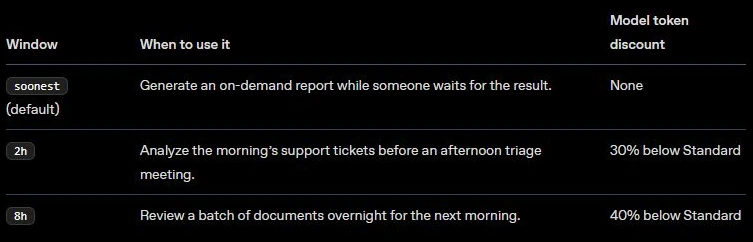
OpenAI’s Responses API can use a discounted two-hour or eight-hour background completion window for some non-urgent jobs. The November 17 changelog describes token rates 30% below Standard for the two-hour window and 40% below Standard for the eight-hour window on supported models. The feature is in public beta. Choose a window only after deciding how long your application can wait for a result.

Choose the window around the handoff
An overnight document check can fit the eight-hour option if a colleague first needs the result tomorrow. An interactive request with a narrow deadline should use a different workflow. OpenAI describes soonest as the default when the window is omitted. The discounted modes require Standard processing and share a Batch/Background rate limit. Their cache entries are separate from ordinary Standard requests.
Submit once and save the response ID
The following request shape uses a synthetic task and the documented eight-hour fields. Use the official guide to verify model and region availability before using an API credential.
{
  "model": "gpt-6.2-sol",
  "input": "From this sample list, report duplicate IDs: A01, B02, A01.",
  "background": true,
  "service_tier": "default",
  "background_options": {"completion_window": "8h"}
}
Send the payload to POST /v1/responses. Save the returned response ID. While the job is queued or in progress, poll that ID at a reasonable interval or use a webhook to capture completion. Check the terminal status and the actual output before marking your own workflow complete. The expected duplicate in this example is A01. This article documents the request shape and expected result. We did not submit a paid API job.
What a worker should do on the next poll
Suppose the overnight duplicate-ID check has already returned a response ID. A worker restarts halfway through the night. Its first question should be what happened to that ID. Retrieve the saved response, inspect its status, and decide whether to wait, consume the result, or surface an error. The small Python function below lets you exercise those decisions offline with representative status values.
def next_step(status):
    if status in {"queued", "in_progress"}:
        return "wait, then retrieve the same ID"
    if status == "completed":
        return "validate and save the output"
    return "stop and inspect the response"

for status in ("queued", "in_progress", "completed", "incomplete", "failed"):
    print(f"{status:12}  {next_step(status)}")
For this sample, the completed branch still has a job to do. Extract the duplicate IDs and compare them with the expected set containing A01. A completed response containing B02 would fail that check. On an incomplete response, retain the partial output and the reported reason for inspection. On a transient retrieval failure, retry the lookup with a bounded delay and the same ID. Creating another response at that point risks doing the work twice.
Account for temporary storage and retries
OpenAI says background mode temporarily stores response data for retrieval even with store: false or Zero Data Retention settings. If your workload requires that data never be temporarily held, verify compatibility before using background mode. Also log the configured window and provider response ID beside your job ID so a queued request is not accidentally submitted again.
Release details are in the OpenAI API changelog. For model selection, see our GPT-6.2 Astra and Sol comparison.