Code Lab
Haru 4B Explained: Running a Full-Duplex Voice Model Locally
CODE LAB · PROJECT SPOTLIGHT
Haru 4B Python · Apache 2.0
Read the full-duplex frame loop and choose a documented local runtime.
Preview: higurashi-ai/Haru on GitHub · release availability checked separately below.
Haru 4B is a spoken-dialogue base model that can receive speech while producing its own response. The useful distinction is not simply a faster voice: listening, backchannels and overlapping speech belong to the model’s continuous conversation.
Higurashi’s November 13 technical post and public repository make this a useful Code Lab subject. We inspected the documentation and pinned implementation; we did not run Haru’s model for this article. The installation steps below are the project’s documented route, not a claim of a successful local benchmark.
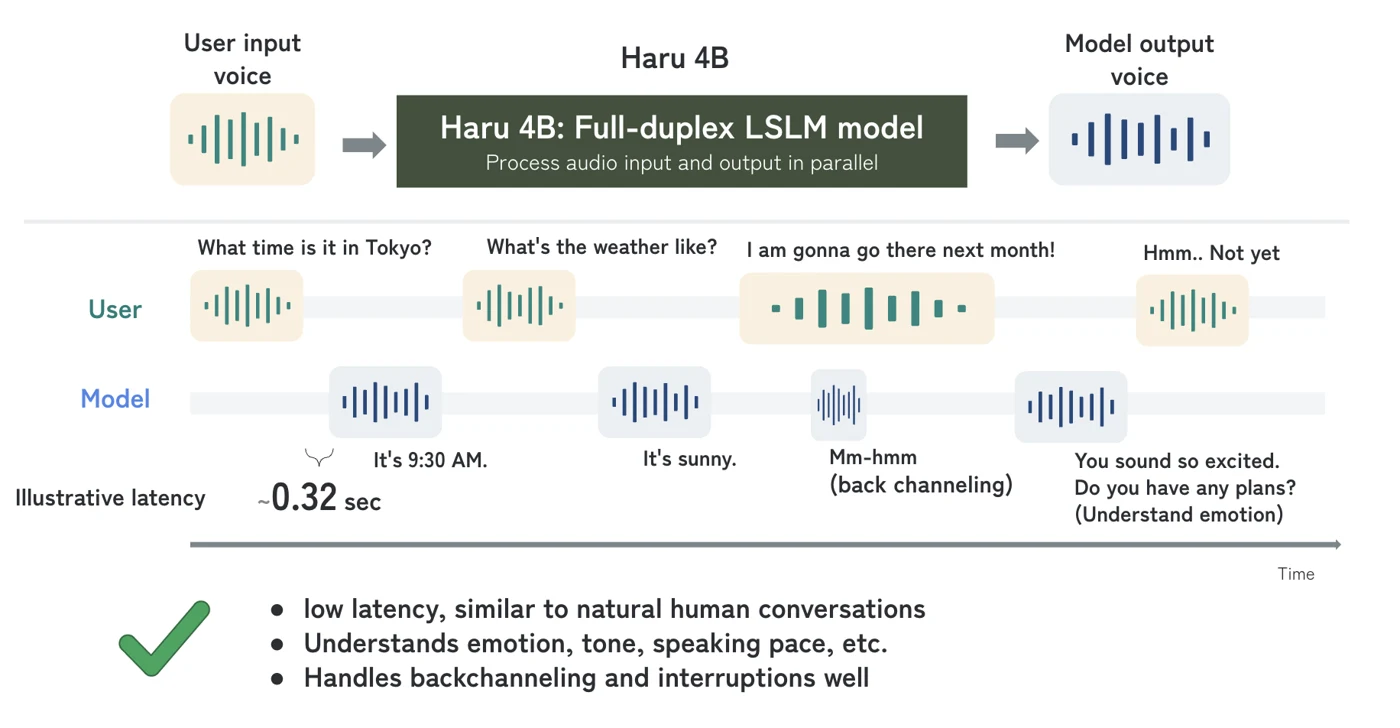
Full-duplex is different from a three-stage voice pipeline
A conventional pipeline recognizes speech, asks a language model for a response and synthesizes the answer. That is easy to describe as three boxes, but the boundaries matter: converting speech to text can discard cues about delivery, and a system needs a policy for deciding when the other person has finished.
Haru instead aligns incoming audio, generated audio and text in a recurring frame. This gives it a way to process your next sound while speaking. It does not establish that every interruption will be handled politely, that facts will be correct or that a slow device will meet the intended timing.
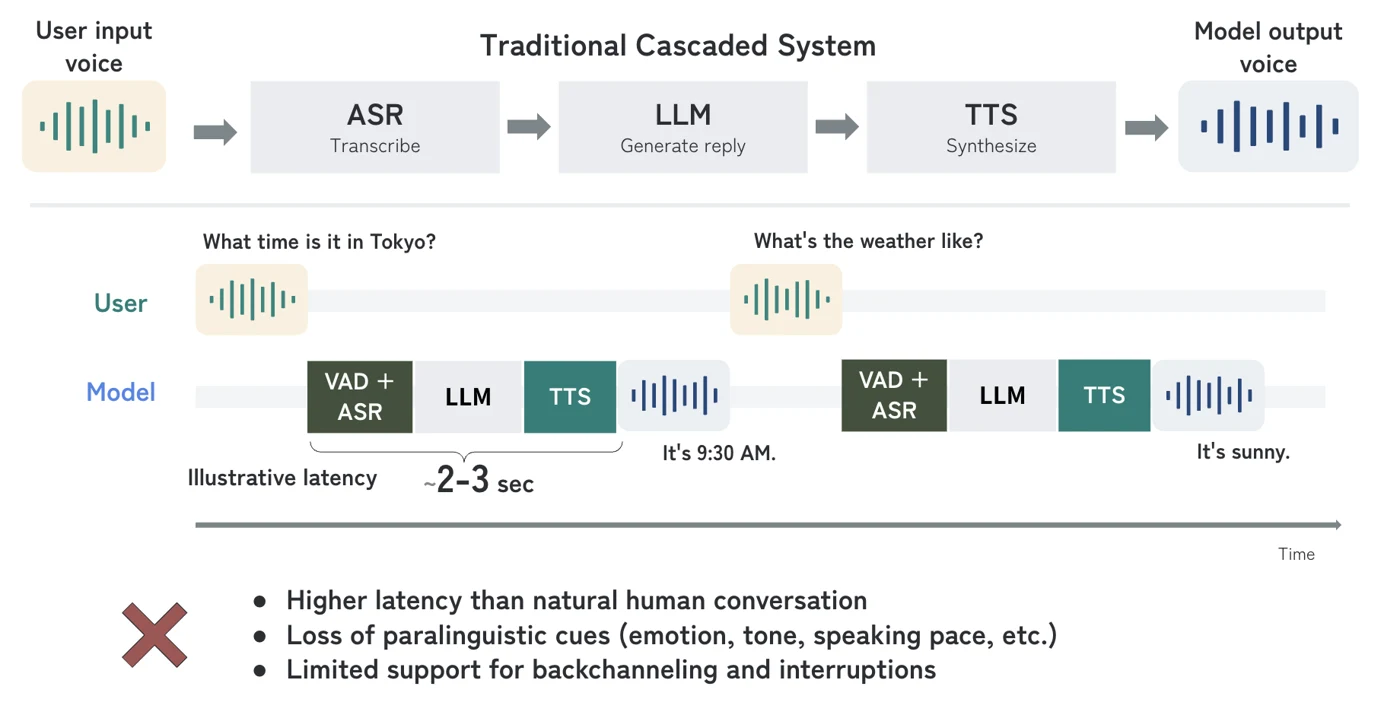
The documented frame rate is 7.5 Hz, or roughly one frame every 133 milliseconds. That is a scheduling interval in the model design. End-to-end delay also includes capture, buffering, computation, decoding and playback, so it should not be advertised as a measured 133 ms response time.
Choose a runtime before following installation commands
| Route | Documented purpose | Practical boundary |
|---|---|---|
| PyTorch + web demo | NVIDIA quick start; the README suggests about 12 GB GPU memory | That is project guidance, not a guarantee for every GPU and configuration. |
| MLX + native macOS app | Apple Silicon implementation | Follow the Mac-specific build instructions; do not reuse the CUDA setup unchanged. |
| vLLM-Omni plugin | A separate serving integration | A deployment route with its own environment requirements. |
For the NVIDIA route, clone the repository and use its setup instructions. The documented minimal sequence is:
git clone https://github.com/higurashi-ai/Haru
cd Haru
pip install -e ./haru
python -m haru.server --hf-repo higurashi-ai/Haru-4B
Open http://localhost:8998 after the server starts. The web demo needs microphone access on localhost or HTTPS. This is a local address; it is not a public hosted Haru service. The repository also documents sharing options, but public sharing is unnecessary for a first local evaluation. Pinned setup README ↗
Bring a permitted reference voice
Voice clips are not bundled. The README asks for a clean, single-speaker reference between three seconds and three minutes. Use a recording you are permitted to use. The character card and the reference voice are separate inputs: one describes the conversational character, while the other conditions how the model sounds.
Wired audio is recommended in the project’s latency guidance. Device and Bluetooth buffering can affect an otherwise identical experiment. Record those conditions before attributing every pause to the model.
Inside the actual source: one user frame advances the session
This excerpt is the step method in haru/haru/session.py, pinned to the commit shown below.
The method requires start() to have initialized the session. It reshapes the incoming samples, checks the expected frame length and encodes them into a user-audio latent. The embedding call combines the current text token, previous model-audio latent and newly received user latent. The cached language-model pass then supplies the hidden state used to emit another frame.
This explains how audio input participates in every step. It does not show a whole application’s microphone buffering, network path or measured responsiveness. The 3,200-sample input at 24 kHz corresponds to the documented frame interval; it is not a quality score.
Source: higurashi-ai/Haru, original implementation at the linked commit. Apache License 2.0; syntax colors and original line numbers added for readability. Project license ↗
A base model is not a finished assistant
The model card describes Haru as a pretrained base model released for research. Its language list includes Korean, but language support alone does not establish instruction following, factual reliability or robust behavior in every accent and recording condition. A natural-sounding response can still be inaccurate.
A useful first evaluation would keep one character card and reference voice fixed, then try a short clean turn, a backchannel and one interruption. Preserve the input and output and note where the model continued, paused or misunderstood. That evaluation has not been completed here; the published conversation demonstrations remain the creator’s examples.
Where are the downloads and releases?
The repository contains inference code, while the model weights are distributed through the linked Hugging Face model page. Check those two sources together. The GitHub Releases link in the overview is for release history; it should not be read as a promise of a one-click desktop installer.
For examples to listen to, open Higurashi’s official conversation demos ↗. For the broader full-duplex concept, our Fish Audio Live 3 explainer provides another published architecture and turn-taking discussion. It is context, not a head-to-head benchmark.
Reviewed November 16, 2026. Discovery lead: JoCoding’s edited briefing ↗. Primary documentation and code were checked independently. Creator diagrams are attributed above; no Haru inference run is claimed.
Discussion