AI News
ACE Music v1: From Lyrics to a Song—and What the Free Plan Allows
ACE Music v1 is an online music-generation service for turning a description or lyrics into a song. The useful first decision is whether you already have the words: keep lyrics separate from musical direction, then check the model, generation cost and permitted use before making a track.
This is a current-service explainer checked November 16, 2026, following JoCoding’s briefing. We checked the official product guidance and public input workflow. We did not generate or evaluate a song, and we are not treating a future Flash release as an available local model.
Start with the task, not a model ranking
If you already wrote the lyrics, use the Lyrics to Song route. If you only have a subject or mood, start with the general music-generator workflow. A melody or score is a third kind of input and should not be assumed to use exactly the same route as text.
The product page distinguishes v1 from v1.1 Preview, describing the latter around melody and score input. Keep the model selection in the record of an experiment. Otherwise, a result from one mode can easily become an unsupported claim about another. Official v1 product guide ↗
What our input check established
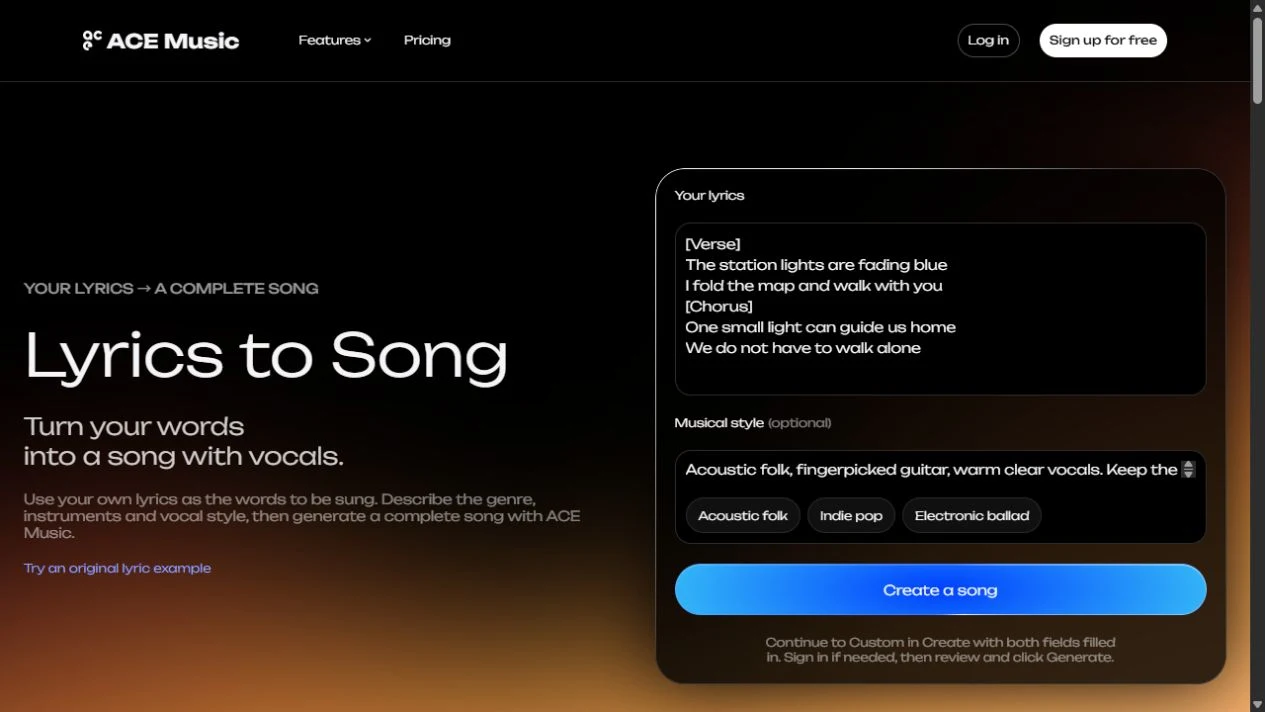
We entered these short original lyrics and supplied a style describing acoustic folk, fingerpicked guitar and clear warm vocals:
[Verse]
The station lights are fading blue
I fold the map and walk with you
[Chorus]
One small light can guide us home
We do not have to walk alone
The public page accepted both fields. Choosing Create a song opened an account/sign-in dialog. We stopped at that access boundary: no generated audio, lyric accuracy, musical quality or charged-credit result was observed. The exercise is useful for locating inputs and the login step; it is not a successful music-generation test.
In your own run, review the fields again in the actual creation interface. A landing-page handoff and the final Generate action are separate steps. Record the selected model and displayed cost at the point of generation, rather than assuming a promotional page describes your exact account entitlement.
Keep the words and their performance directions separate
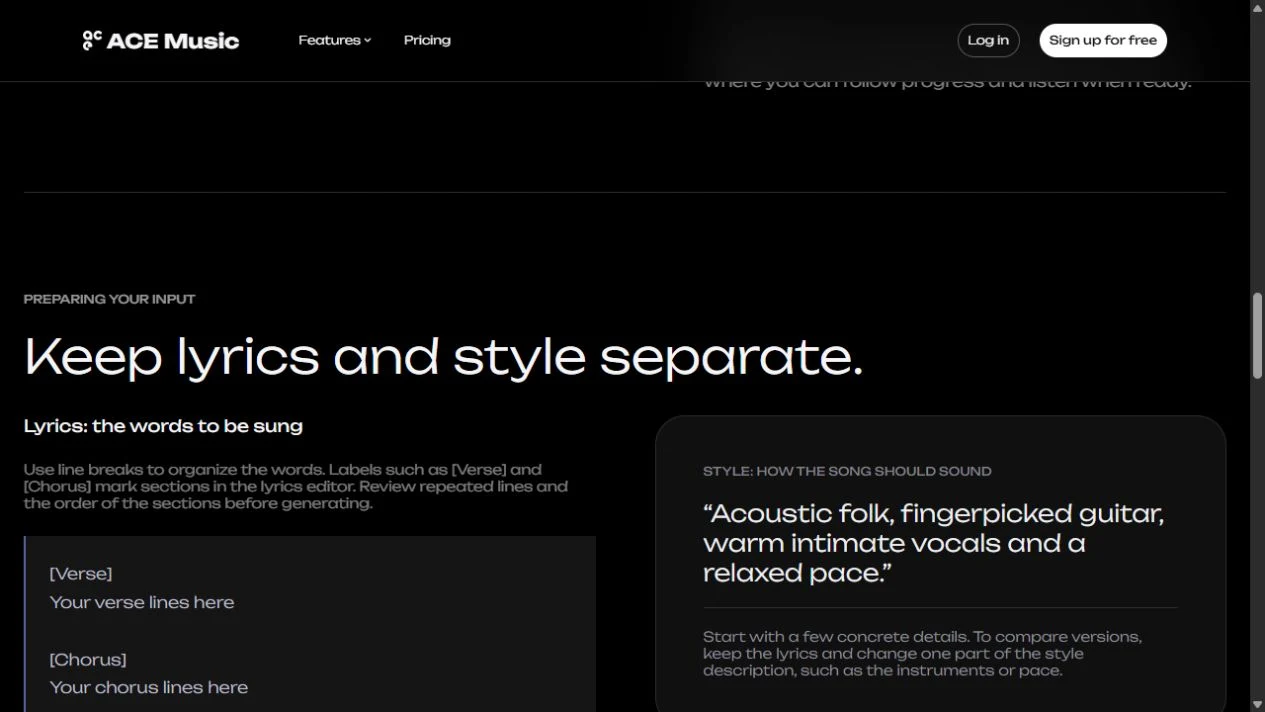
Section labels and line breaks make it easier to inspect what was submitted. Put the actual words in the lyrics field. Use the style field for genre, instrumentation, vocal delivery and pace. The product guidance also describes performance cues within lyrics, but their presence in an input is not proof that the result followed them.
A useful comparison keeps the words unchanged and varies one musical instruction. For example, compare a restrained guitar arrangement with a more energetic delivery. Check whether lines were omitted, repeated, reordered or made difficult to understand. A pleasant tune can conceal a failure to preserve the requested words.
Understand the output and the next editing step
| You want… | What to verify | Why it matters |
|---|---|---|
| A complete song | Generated audio, model choice and lyric fidelity | A completed job does not prove every requested word is present. |
| Vocal and instrument parts | Availability and behavior of the stem-splitting tool | Separated stems are a later processing step, not evidence that the generator originally emitted isolated studio tracks. |
| A MIDI file for a DAW | The conversion route and what notes it recovers | MIDI describes musical events; it is not the same file as the finished vocal recording. |
| A result based on a melody or score | The selected mode and model version | The official guide distinguishes v1 from v1.1 Preview. |
The official product page presents MIDI conversion and stem separation as ways to continue working after a song is generated. We did not exercise those tools. If the next task is an edit in a DAW, check the actual exported parts rather than assuming a single “download” button supplies everything you need.
Free access and commercial use are different questions
The official FAQ says songs generated on a paid plan have commercial-use rights under its terms, while free-plan generations do not. It also says upgrading later does not retroactively grant those rights to earlier free outputs. Check the current plan details ↗ and Terms of Use ↗ for the account and intended use.
That plan distinction does not verify rights in every possible input. Use lyrics and recordings you are permitted to supply, and preserve the plan, date and generation record for a track you intend to publish. We are describing the provider’s stated policy, not certifying a particular song’s clearance.
Flash is a future-release statement, not a download link
The v1 page describes open-sourcing ACE Music v1 Flash in late 2026 as a plan. This check did not verify a released Flash weight package. The currently accessible hosted v1 workflow should therefore be explained on its own terms, rather than advertised as an already available free local model.
The same care applies to the page’s leaderboard promotion: a vocal-music preference ranking is narrower than “best at every genre and task.” We have not independently audited that ranking here. For a first useful article or experiment, lyric fidelity, usable exports and actual account cost are more actionable questions than a universal winner.
Reviewed November 16, 2026. Discovery lead: JoCoding’s edited briefing ↗. Public-page input and access flow checked; no song generation, paid transaction or output-quality test performed. ACE Music interface and published guidance belong to Timedomain and their respective owners.