AI Technical Articles
ChatGPT for Sales: How to Verify a CRM Call Brief
OpenAI’s ChatGPT for Sales is best understood as a work surface over existing sales systems, not as a replacement for the CRM.
That distinction suggests a practical first test: connect one CRM, select one account, and ask ChatGPT to prepare a source-linked pre-call brief. Keep record changes and outbound messages out of the pilot until the team knows whether the generated brief is accurate enough to trust.
OpenAI announced ChatGPT for Sales on November 17, 2026. The product includes OpenAI’s Sales plugin, with workflows for activities such as account research, meeting preparation and follow-up, plus partner plugins for tools including Salesforce, HubSpot, Close CRM, monday CRM, Clay and Confluence.
The useful question, then, is not “Can ChatGPT replace our sales stack?” It is: Can it turn information already scattered across that stack into useful work that a seller can verify?
What ChatGPT for Sales actually adds
Three terms make the architecture easier to understand.
A CRM, or customer relationship management system, stores sales records such as accounts, opportunities, contacts and recorded next steps.
A plugin, in OpenAI’s current terminology, can combine reusable skills, connected apps, app templates and extensions. Skills provide workflow instructions, while apps connect ChatGPT to external services and their information or supported actions. OpenAI explains this model in its Plugins in ChatGPT documentation.
Plugin installation does not itself grant new privileges in the underlying service. Required authorization and provider or workspace permissions still apply. Some connections use a seller’s own account; others can be administrator-managed. Check which connection the workflow will actually use rather than assuming every result comes through the seller’s usual login.
ChatGPT for Sales puts these pieces together. The Sales plugin supplies seller-oriented workflows, while partner plugins can bring in customer context from systems such as Salesforce or HubSpot.
That is why calling it a new CRM would be misleading. The existing CRM remains the place where the customer and opportunity records live. ChatGPT provides a conversational layer that can find, combine and transform information available through the authorized connection.
Installing Sales also does not automatically connect every partner service or include paid third-party subscriptions. OpenAI says partner availability can vary by ChatGPT plan, region, workspace settings and the particular plugin or app.
A sensible first task: the pre-call brief
Pre-call preparation is a useful starting point because it can deliver immediate value without requiring ChatGPT to modify a CRM record.
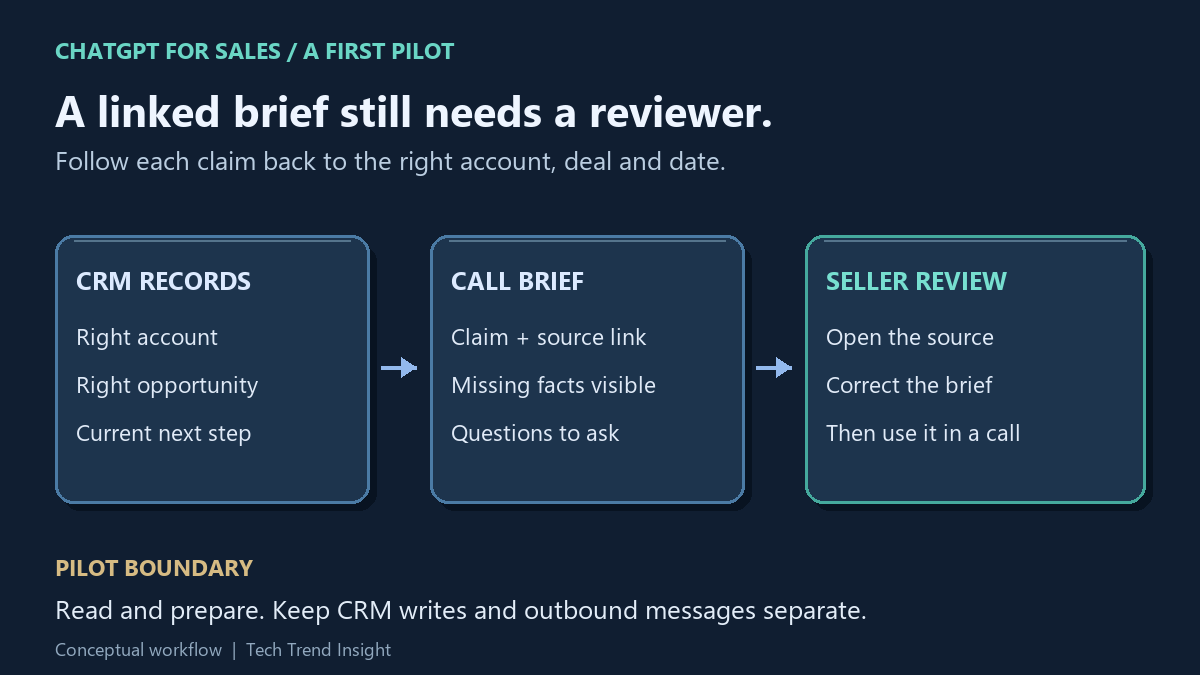
The workflow can be deliberately simple:
- Connect the Sales plugin and one CRM integration.
- Ask ChatGPT to prepare for a meeting with a specific account.
- Have it summarize relevant account history, open deals and recorded next steps.
- Require links back to the relevant records.
- Check consequential claims against those records before using the brief.
This is close to OpenAI’s own getting-started example. After connecting HubSpot, OpenAI suggests asking Sales and HubSpot to prepare a meeting brief containing account history, open deals and next steps, with links to source records and three questions to ask. The guide explicitly tells users to check those records and to review follow-up messages or CRM changes before approving supported actions.
For a cautious pilot, narrow that workflow further:
Prepare a pre-call brief for
[account]. Summarize account history, open opportunities and recorded next steps. Link material claims to their source records. Identify missing information and suggest three questions for the meeting. Do not change any record or send any message.
The final restriction keeps the pilot focused on retrieving and summarizing information. It is an instruction to the model, not a technical read-only permission. Where supported, have the account owner or administrator configure the app to allow the required reads while requiring approval for changes; check the CRM connection’s permissions too. This article proposes a pilot and does not report a test on a live sales account.
A source link is also not proof that a claim is correct. The CRM record itself could be stale, incomplete or associated with the wrong opportunity. Source-linked should therefore mean easy to verify, not automatically trustworthy.
A worked check: correct account, wrong opportunity
Use invented records or an approved test account first. Suppose Northstar has two records: OPP-17, closed in October, and OPP-29, an open renewal. A November 17 note on the renewal says the customer wants a security review on November 20. No owner is recorded.
A useful brief should attach that next step to OPP-29, link the actual renewal record and preserve the missing owner. A brief that cites Northstar but copies the closed deal’s next step has retrieved related information and still failed the task. Adding a plausible salesperson’s name would be a second failure. These record identifiers describe the example; they are not links to real customer data.
For each consequential sentence, compare the claim, the linked record, its date and what the record actually says. Record a correction such as “wrong opportunity” or “unsupported owner” so the next test targets the failure. Do not turn a suggested meeting question into a recorded customer commitment.
How to judge the pilot
There is no need to start with claims about shorter sales cycles or higher close rates. OpenAI markets ChatGPT for Sales around helping sellers move deals forward, but that is a vendor claim, not evidence that a particular deployment will improve those business outcomes.
Instead, inspect a small set of real briefs using observable criteria:
- Traceability: Can material claims about the customer or opportunity be traced to the correct record?
- Recency: Does the brief use the currently recorded next step rather than presenting an older entry as current?
- Missing information: Does it expose gaps instead of filling them with unsupported assumptions?
- Permissions: Does the workflow remain within the access and actions allowed for that seller?
Keep the seller’s corrected brief as the review result. A shorter preparation time is useful only if checking and repairing the result does not consume the saving. Compare the complete preparation-and-review effort with the seller’s usual method before drawing a productivity conclusion; this pilot supplies no measured time-saving rate.
Availability depends on more than the Sales plugin
OpenAI says the Sales plugin itself is available globally across ChatGPT plans, including Free. Its getting-started documentation immediately adds an important qualification: individual partner plugins and capabilities can depend on the user’s plan, region and workspace settings.
The broader plugin documentation also says installation and use can depend on the plan, workspace, role, region and capabilities included in a plugin. Client support can vary as well.
Third-party subscriptions remain separate. Installing ChatGPT for Sales does not provide a Salesforce, HubSpot or other partner subscription.
For organizational deployments, administrators should therefore test the exact combination they intend to use: ChatGPT plan, CRM, plugin, user role, workspace configuration and permitted actions. OpenAI’s administration guidance documents separate controls for plugin installation and underlying app access. Enterprise and Edu workspaces can also use eligible role-based access controls.
What does it cost?
OpenAI describes ChatGPT for Sales as a plugin experience within existing ChatGPT plans rather than assigning a separate price to the Sales plugin.
As checked November 18, 2026, for a self-service ChatGPT Business deployment OpenAI lists Standard seats at US$25 per user per month on monthly billing or $20 per user per month billed annually. Premium seats are $125 per user per month on monthly billing or $100 per user per month billed annually and provide higher usage limits. Business workspaces require at least two paid seats.
Those numbers are ChatGPT Business seat prices, not the total cost of a sales deployment. CRM and other partner subscriptions remain separate, and a particular integration may have its own account, licensing or availability requirements. OpenAI maintains the current details in its Business overview; prices can vary by country and currency.
For a two-Standard-seat example at those U.S. dollar rates, monthly billing is $50 per month. Annual billing is $480 for the year, equivalent to $40 per month. These estimates exclude tax, CRM or partner subscriptions and additional usage credits. Neither example establishes that Business is required for the Sales plugin.
Permissions remain part of the design
A useful sales assistant can work with commercially sensitive information, so access control is part of the architecture rather than an afterthought.
OpenAI states that, by default, it does not use inputs or outputs from ChatGPT Business, Enterprise or Edu to train or improve its models. Those commitments are described on OpenAI’s business data privacy, security and compliance page.
That business-workspace commitment should not be assumed from the Sales plugin’s availability on Free: evaluate the data terms for the actual account or workspace used.
The underlying apps still matter. OpenAI distinguishes plugin installation from app access, and administrators can control which apps and supported actions are available. The user’s authorization with the external provider applies as well.
OpenAI’s current app-permission guide lists options including “Always ask,” “Allow read actions” and “Allow low-risk actions,” depending on the account, app and workspace. A setting controls when approval is requested; it does not grant source-system access. Inspect the saved setting for the exact connection instead of relying on an assumed default. Sensitive actions may be denied rather than presented for approval.
That makes the source-linked pre-call brief a useful boundary for an initial deployment. It tests the part of ChatGPT for Sales that matters most before automation: whether the system can turn permitted information from existing sales tools into a concise, traceable result that a seller can verify.
Expand only when the team can explain both the facts and the access path behind a brief. Drafting a follow-up can be the next experiment; sending it or updating a CRM record introduces a separate approval and result-verification step. Keep the seller responsible for what is communicated or recorded.
Sources
- OpenAI: Introducing ChatGPT for Sales
- OpenAI Help: Getting started with ChatGPT for Sales
- OpenAI Help: Plugins in ChatGPT
- OpenAI Help: Admin controls, security and compliance for plugins and apps
- OpenAI Help: ChatGPT Business overview
- OpenAI: Business data privacy, security and compliance
- OpenAI Help: Managing app permissions in ChatGPT