Gaming Lab
Pool of Radiance: Ruins of Myth Drannor — First Impressions
First impressions of a classic party RPG: the opening battle, the inventory, and the skills behind every decision.
Four adventurers arrive among moss-covered ruins, fallen bodies, and burning debris. The orcs are still there. Before the scenery has much time to settle in, combat begins—and the first question is where each party member should stand.
Pool of Radiance: Ruins of Myth Drannor makes its priorities clear early: positioning, character abilities, and the actions left in a turn. This first look covers party selection, the first orc encounter, and the menus that explain how the group works.
Pool of Radiance: Ruins of Myth Drannor
A classic fantasy RPG set in the Forgotten Realms, built around a party of adventurers and tactical, turn-based combat.
View the game, current price, and demo on Steam ↗
Game at a glance
PC · RPG| Genre | RPG / CRPG · Party-based · Turn-based combat · Dungeon crawler |
|---|---|
| Price · Korea | ₩19,800₩22,000−10% |
| Steam release | November 6, 2026 |
| Original release | 2001 |
| Developer | Stormfront Studios |
| Publisher | SNEG |
| Platform | Windows PC |
| Party size | Up to four starting heroes; up to six with recruits |
| Languages | English, French, German, Spanish (Spain), Polish, Russian, Traditional Chinese |
| Demo | Available on Steam |
Store details checked November 7, 2026. The price above is the Korean store price shown on that date; regional prices and promotions vary.
Building a party before taking the first step
The new-game roster lets you create characters or choose from existing adventurers. For this opening encounter, the group consisted of Corran D’Arcey, Skylar, Ghleanna Stormlake, and Kestrel. Choosing four ready-made characters gets the adventure moving without spending the whole session on character creation.
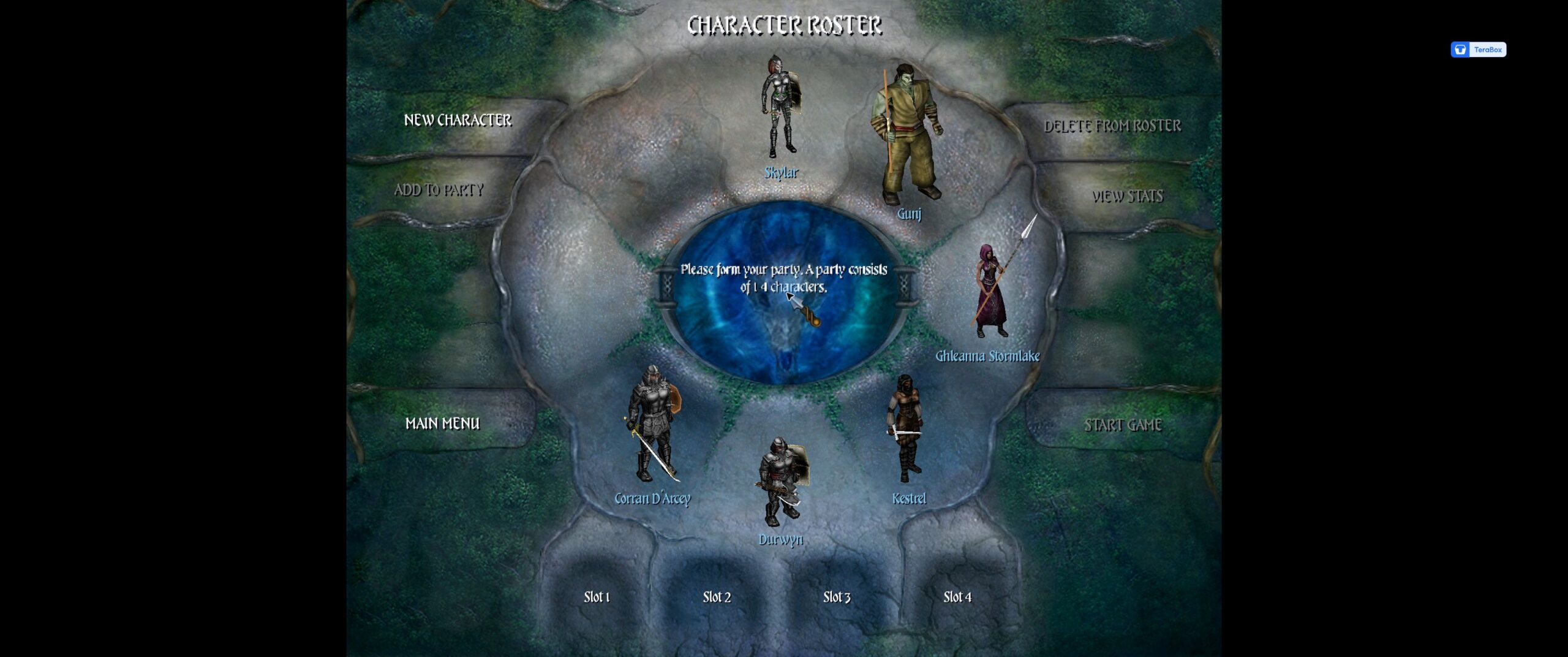
The character sheets quickly make the different roles clearer. Corran is a level-one human paladin, Kestrel a level-one human rogue, and Ghleanna a level-one half-elf sorcerer. Their health, armor, skills, and special abilities give them different jobs even at the beginning.
Walking into range can use up the turn
The first encounter immediately makes distance matter. Clicking an orc does not guarantee a sword swing: a character may spend the available actions just reaching it. The path preview and AP tooltip explain whether a move leaves room for an attack.
That initially feels slow. Characters move individually, and getting everyone into position takes patience. Once the action costs become clearer, movement starts to feel like a tactical choice rather than a gap between attacks.

Inventory: what the character is carrying
The character sheet puts the adventurer on the left and a grid of carried items on the right. Corran’s inventory showed a bow and a Ceramic Jar of Ointment, with an ENC 43 / 300 readout and a Light load status. The weight display is worth checking as equipment accumulates.
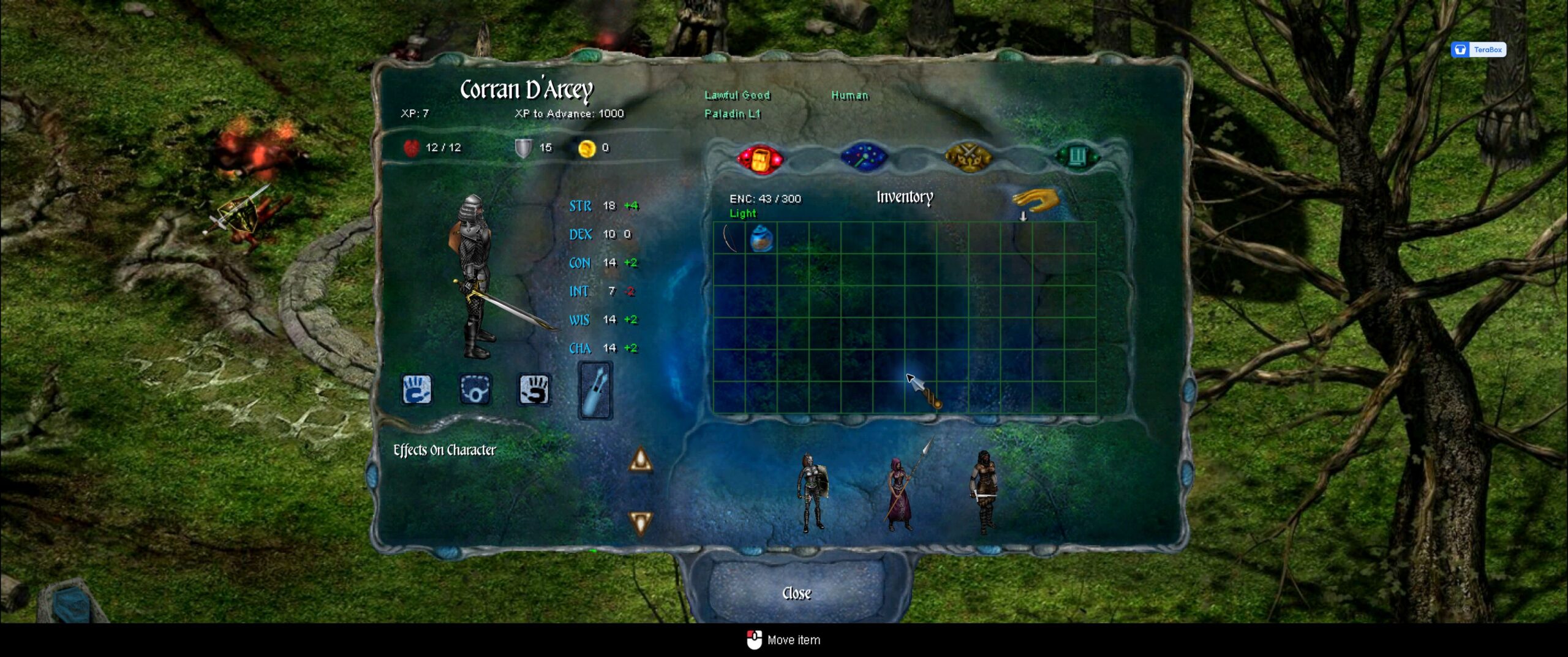
Right-clicking the jar reveals a Salve of Light Healing, described as casting Cure Light Wounds at level 5, with a weight of 1. Item details help distinguish a healing supply from ordinary loot without having to use it first.
The interface uses a pick-up-and-place interaction for items—the bottom prompt changes to “Move item.” Keep an eye on the selected character rather than treating the inventory as one anonymous party bag. Small character models along the bottom switch between companions, making it easier to compare their loadouts and numbers.
Three readouts across the top are particularly useful: the red health symbol shows current and maximum HP, the shield shows Armor Class, and the gold coin shows money. Ability scores such as STR and DEX sit beside colored modifiers; the modifier is the bonus or penalty that feeds into relevant rolls.
The four character-sheet tabs
| Red backpack | InventoryCarried items, the item grid, and encumbrance. Start here when checking supplies and equipment. |
|---|---|
| Blue wand | SpellsKnown spells grouped by level, with remaining uses shown for each group. |
| Gold crossed weapons | Skills & FeatsSkill modifiers, feats, and class abilities. This is where the differences between a rogue, paladin, and sorcerer become concrete. |
| Green record | StatsAttack bonuses, saving throws, Armor Class, initiative, movement rate, and spell-related defenses. |
A useful habit: right-click a skill, feat, or spell name in the character sheet to read its detailed help. A name alone rarely tells you the conditions, limits, or rolls involved.
Reading the battlefield interface
The colored rings under the party members match their colored selectors on the lower-right panel. The highlighted selector identifies the active character. In combat, the sequence of colored emblems at the upper left shows the initiative order, while the text beneath it records rolls and outcomes.
The center action bar holds shortcuts for the selected character, including skills and usable items. Its contents change with the character and situation. In the combat screenshots, shield, eye, hand, magnifier, and potion symbols appear alongside character-specific abilities; use their tooltips rather than assuming every character has the same commands. The bottom prompts are also helpful: Space ends a turn, 1–6 switches characters during exploration, and the middle mouse button centers the camera.
Skills, feats, and class abilities do different jobs
The Skills & Feats page separates three systems. Skills have numerical modifiers for checks. Feats alter what a character can do or how an action works. Class abilities come from the character’s profession. They all influence play, but they are not one interchangeable list of attack buttons.
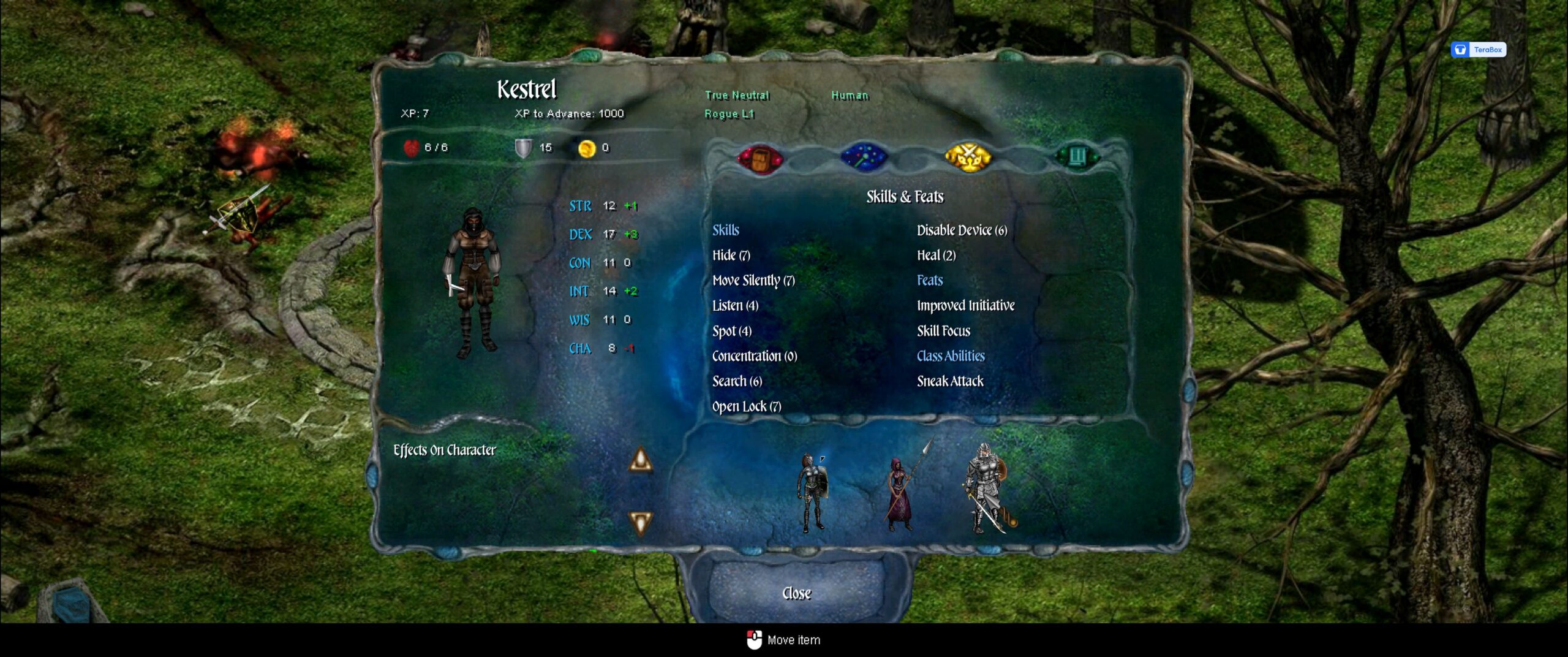
| Search | Find secret doors, simple traps, hidden compartments, and other concealed details. The help explains that walking performs a reduced search automatically; deliberately targeting an object or area uses the skill at full effectiveness. Kestrel shows 6, compared with Corran’s −2. |
|---|---|
| Open Lock / Disable Device | Kestrel has separate entries for opening locks (7) and disabling devices (6). These are distinct utility skills to look for when the party encounters a lock or a trap. |
| Hide / Move Silently | Separate stealth skills for avoiding notice and moving quietly. Kestrel shows 7 in each; Corran shows −5 in each. Those numbers are check modifiers, not percentages. |
| Heal | A successful check can stabilize a dying ally by stopping blood loss; the help specifically describes characters at −1 to −9 HP. It uses Wisdom. This is a practical distinction from casting a spell that restores hit points. |
Sneak Attack
Kestrel can deal extra damage when flanking an enemy or when the target loses its Dexterity bonus to Armor Class. The help lists +1d6 at level one; ranged sneak attacks require the target to be within 30 feet.
The opening battle’s log recorded a sneak attack during the final exchange. Positioning therefore changes more than the distance to the enemy.
Power Attack
Corran’s feat trades melee accuracy for damage. Its help describes moving part or all of the base attack bonus from the attack roll to the damage roll.
That trade-off is worth considering alongside the displayed hit chance: extra damage has little value when the attack misses.
Corran’s page also lists Improved Critical, Divine Grace, and Lay on Hands. Kestrel has Improved Initiative and Skill Focus. The roster may look straightforward, but the sheets give each companion a more specific toolkit than “another person with a weapon.”
Spells: ranged damage and a limited pool of uses
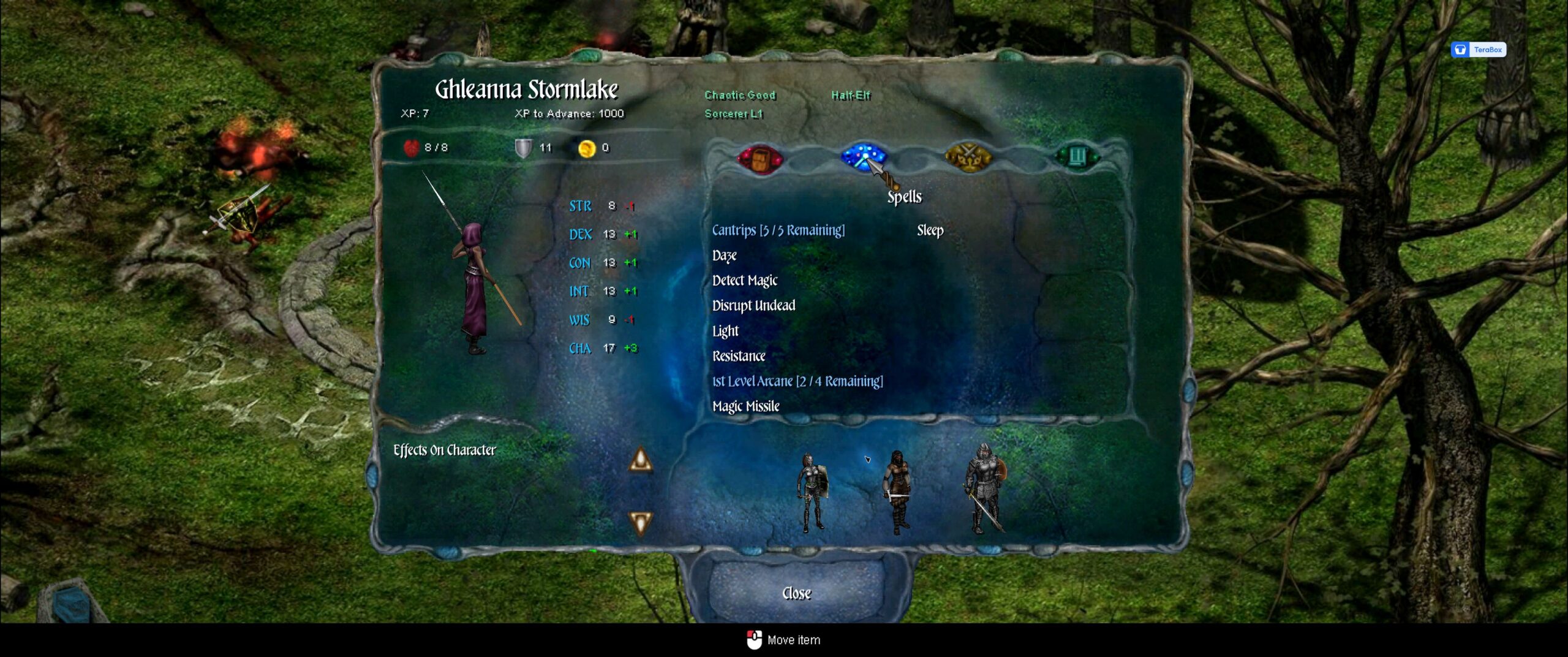
While the front line moved toward the first orc, Ghleanna could act from farther back. The path was right-click the character → Arcane Spells → level 1 → Magic Missile, followed by selecting the enemy. The first orc fell after that spell.
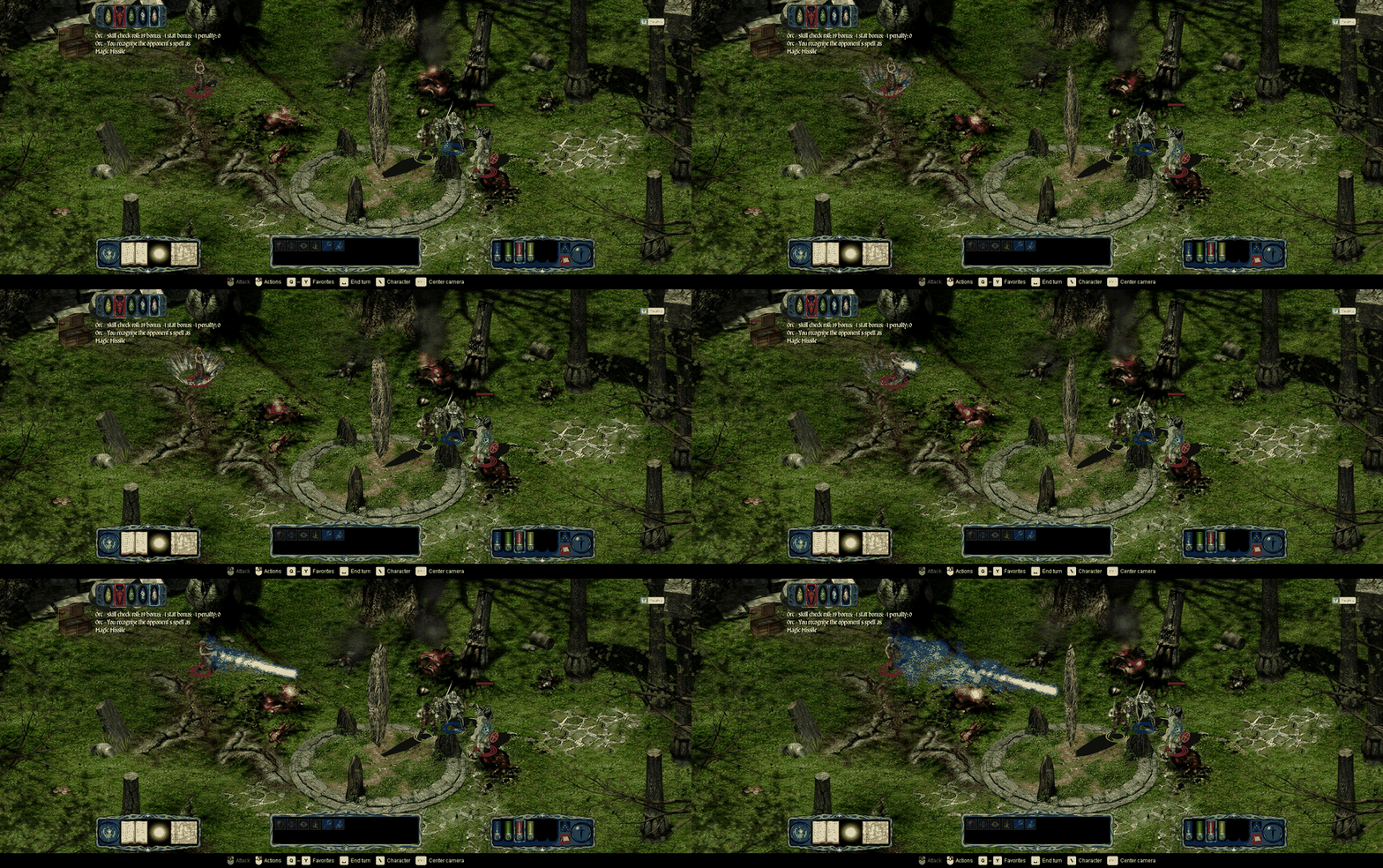
Magic Missile
The in-game help describes one missile dealing 1d4 + 1 damage at the starting caster level. It hits without a normal weapon attack roll and allows no saving throw, though spell resistance still applies.
More missiles become available at higher caster levels. Early on, it offers a ranged alternative to spending a whole turn closing into melee.
Sleep
The spell list also offers Sleep. Its help describes a 15-foot-radius area affecting up to 2d4 Hit Dice of living creatures, starting with weaker creatures. Targets with five or more Hit Dice are excluded, and a Will save can resist the effect.
Damage can wake a sleeping target. This makes it an option for temporarily taking enemies out of the fight, rather than another damage spell. It was available in the opening loadout; Magic Missile was the spell used in this encounter.
Ghleanna’s first-level spells share a remaining-use counter: the pool began at 4/4 and fell to 2/4 after two casts. Choosing a spell therefore also means spending a limited resource. The initial menu navigation takes practice, but the spell page makes the available choices and remaining uses much easier to understand.
A 40% hit chance changes how a sword swing feels
Once Kestrel reached the remaining orc, the attack preview showed 2–7 damage and a 40% hit chance. The attack missed. The combat log then showed the attack roll, its bonus, and the target’s Armor Class.
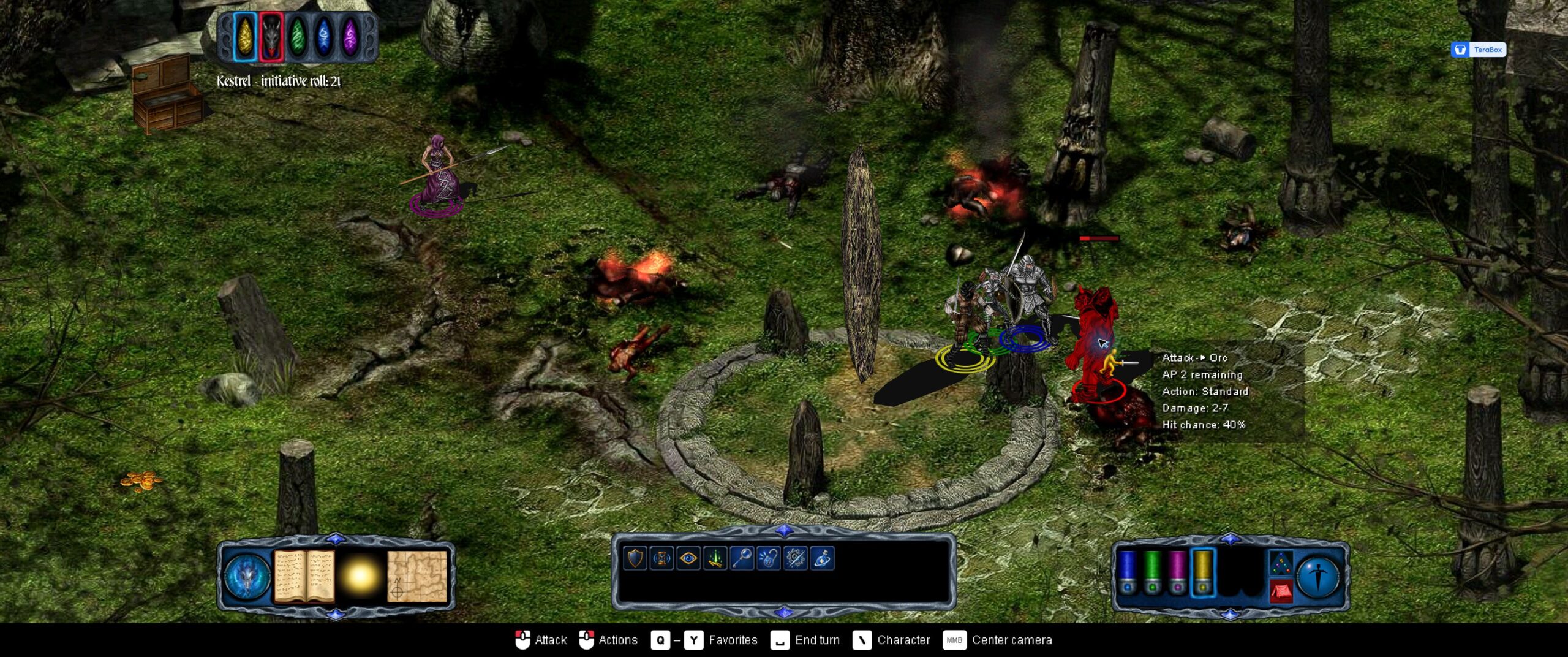
This is where the game’s pace will divide players. Anyone looking for immediate action may find the separate turns and failed rolls frustrating. Anyone who enjoys reading the numbers and making the next decision has something to work with from the first encounter.
First impressions
The ruined stonework, greenery, and burning remains create an appealing old-fantasy atmosphere. After the battle, a DM-style text sequence introduces pages from a fallen adventuring party’s journal, giving the encounter a connection to the next part of the story.
The initial friction comes from learning the interface as much as learning the rules. Movement consumes actions; skills are spread across character menus; spells have their own uses and targeting rules. Once those pieces start to fit together, the party feels more interesting than it does on the selection screen.
A deliberate, rules-heavy opening with distinct party roles. If learning the tools of an old fantasy RPG sounds inviting, this is an opening worth exploring further.
This first look ends after the opening orc encounter. Longer dungeon exploration, progression, and late-game combat are subjects for a later visit.