AI News
Claude Whiteboards, Sheets and Data: What a Shared AI Workspace Changes
Claude’s new workspace tools make the result of a conversation something a team can keep editing: a board for the plan, a sheet for its assumptions and a data view for the evidence. The important distinction is which information each artifact actually contains and can update.
Scope: Whiteboards and Sheets beta; Claude Data generally available with some beta features
Read the official announcement ↗
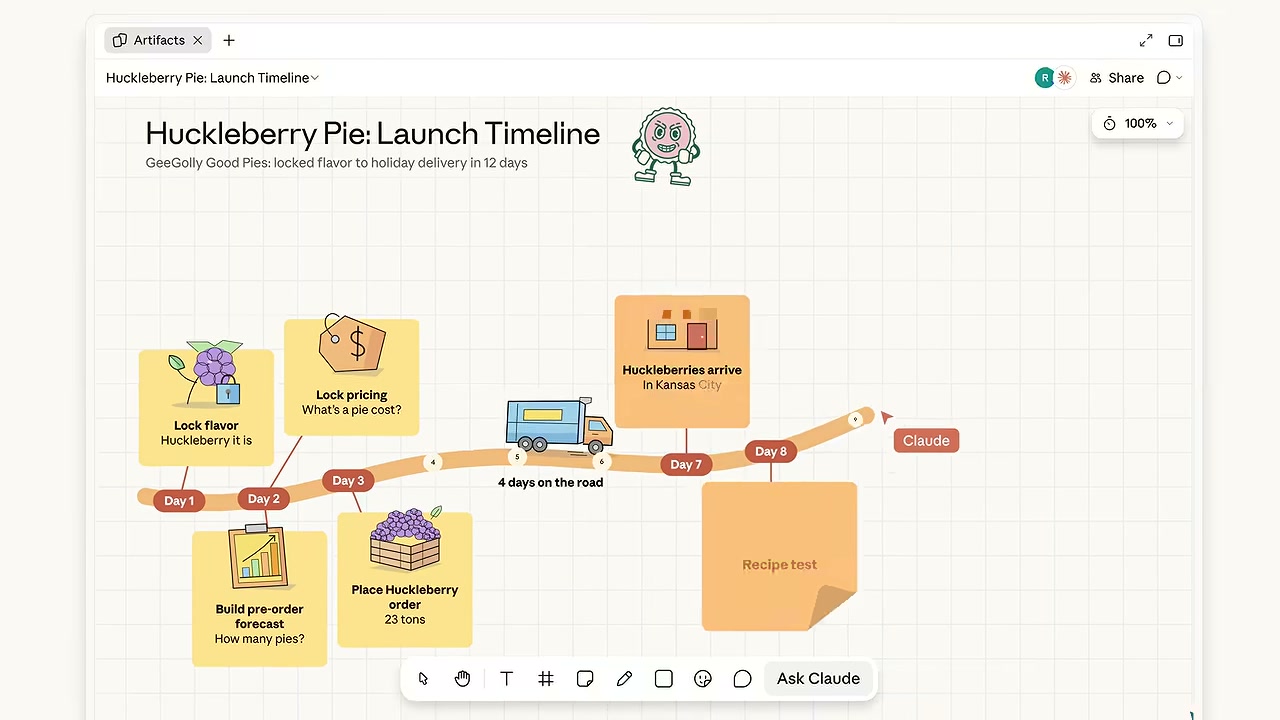
A board makes dependencies visible
The launch timeline shows a useful progression: settle the product, set a price, build a forecast and arrange delivery. A board gives those steps positions and connections. That is more informative than an attractive list if the team can see which decision prevents the next step from starting.
For your own project, ask the board to distinguish a decision from an action and an assumption. “Choose the launch date” is a decision; “send the assets” is an action; “the printer needs four days” is an assumption to verify. Putting all three on identical sticky notes can conceal a dependency even when the layout looks tidy.
The Whiteboards guide describes starting from a chat or the Artifacts tab, reorganizing a region and turning a board into a document or deck. It also documents PNG export and says connected-app context is not used on a board. A shared diagram should not be mistaken for a live view of every external task system.
The sheet exposes the assumptions behind a number
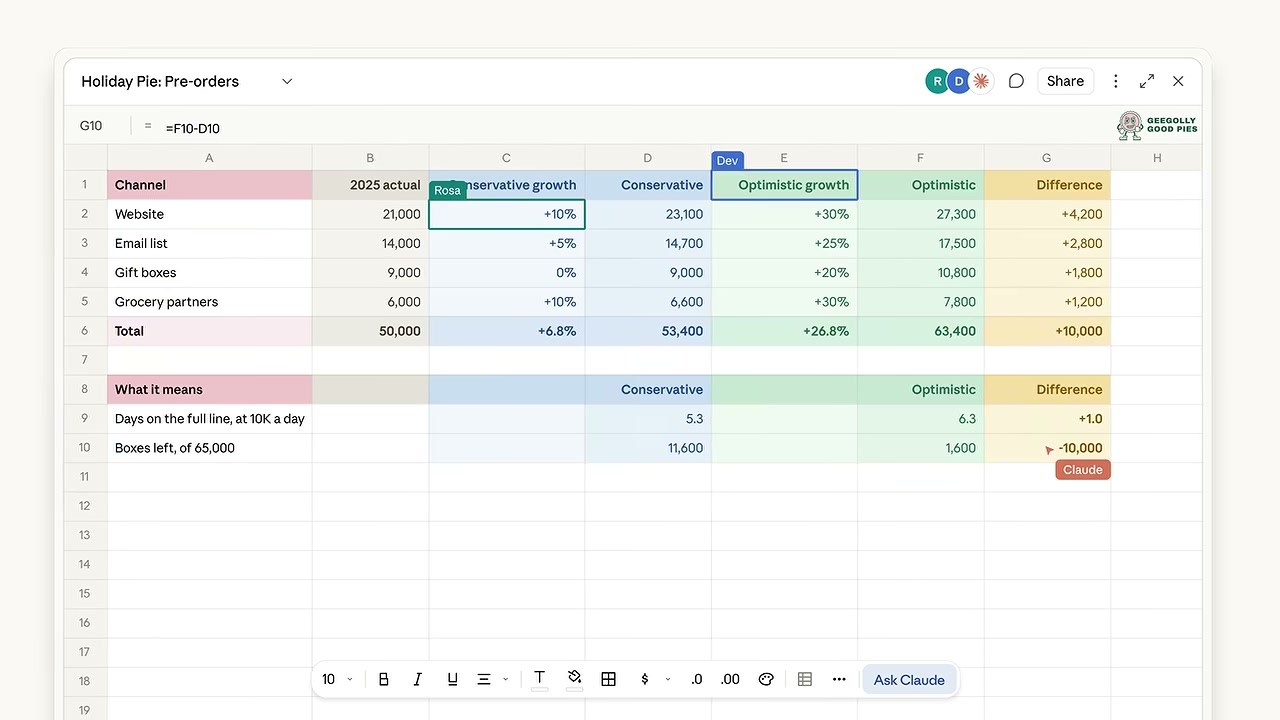
The screenshot separates historical values from conservative and optimistic growth assumptions. That structure matters more than the forecast’s visual polish. A reviewer can ask which inputs are known, which are guesses and which cells calculate the result.
A practical check is to change one input and inspect the dependent total. For a fictional budget, ten items at $25 should total $250; changing the quantity to twelve should produce $300 without rewriting the total by hand. This is an illustrative acceptance check, not a test we performed in Claude. It gives a team a concrete way to distinguish a functioning model from numbers that merely look consistent.
| Artifact | Useful job | Review question |
|---|---|---|
| Whiteboard | Organize options, owners and dependencies. | Which assumption or decision is blocking the next action? |
| Sheet | Keep inputs and formulas editable. | Does a changed input update the right totals? |
| Data | Explain connected metrics through approved queries. | What query, definition and refresh produced this figure? |
Claude Data is a separate data workflow
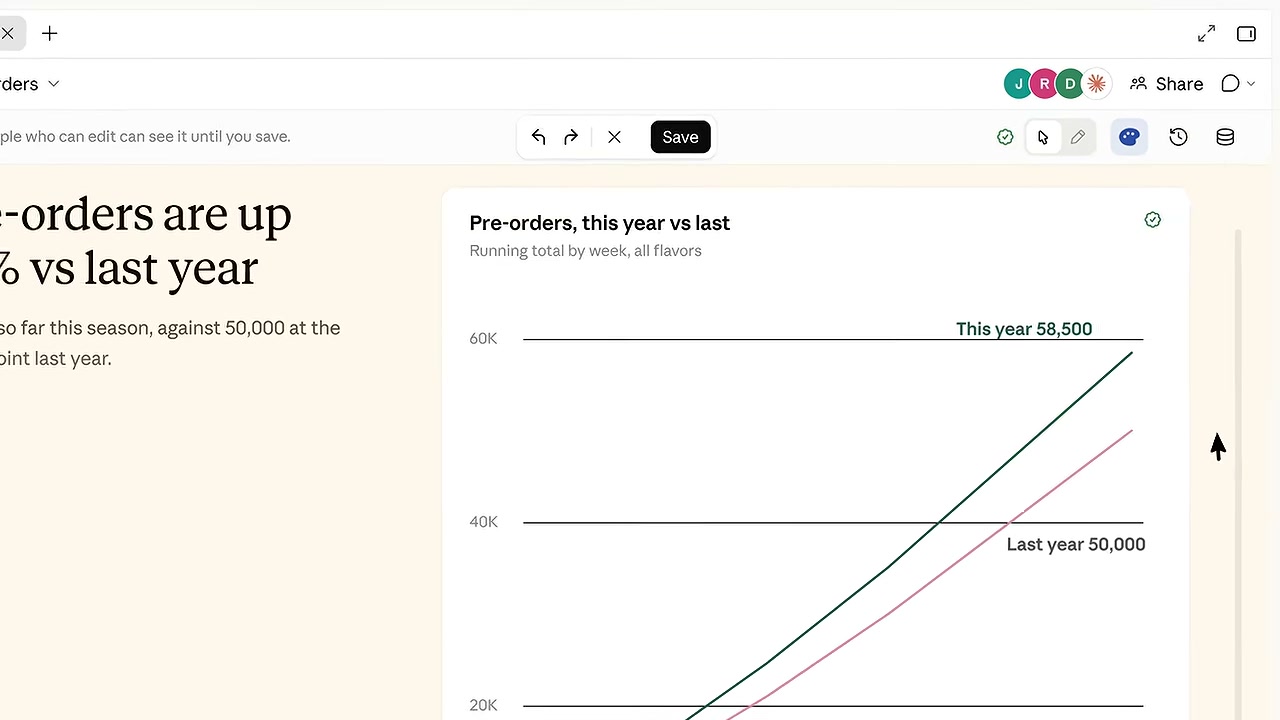
The data story turns metrics into a claim that a reader can follow. The review task is to keep the claim attached to a definition: does “pre-order” mean submitted, paid or still active after cancellation? A certified query can standardize that definition, while a refreshed dashboard can still be misleading if the audience assumes a different one.
Anthropic says Claude Data needs a data connector and supports approved-query sharing and refresh controls. That does not mean a Claude Sheet automatically becomes a live source for every other artifact. The Sheets guide explicitly says Sheets cannot pull live connected-app data and other documents, decks and dashboards cannot use a sheet as their data source at launch.
Know the limits before moving a workbook
Sheets is intended for common spreadsheet work. Its guide lists a 100,000-cell limit and missing features including pivot tables, protected ranges and Excel macros. Web and desktop are supported, with basic read-only mobile access. If an established workbook depends on those advanced features, use the existing spreadsheet application or inspect an export before replacing the workflow.
Paid-plan and organization settings matter too. Team defaults differ from Enterprise controls; an unavailable tile may be an access setting. Keep a new artifact private while checking it, and share only the information the intended reviewers need. A source-based walkthrough of these tools is different from proving that an account has every beta feature.
Try a small project with a clear handoff
Start with a fictional launch, a handful of tasks and a small budget. Review the board’s dependencies, the sheet’s formulas and the data view’s definitions separately. Then decide what will be the authoritative record when someone changes the plan. That final decision prevents three editable artifacts from becoming three conflicting versions of the same project.
The related Claude Meetings beta brings a conversation into this workflow. It adds another source of input; it does not make an unverified meeting suggestion an approved plan. Watch Anthropic’s full demonstration externally ↗.
Reviewed November 15, 2026. Discovery lead: JoCoding’s November 15 IT NEWS briefing. Product claims were checked against primary sources. The screens are from Anthropic’s official demonstration. We did not connect a warehouse, share a workspace or claim a hands-on beta trial.
Discussion