Modeling Lab
AniCraft 2D Animation: The Eraser That Started a Homework Dance
For my second AniCraft 2D animation, I wanted the music to arrive through a small accident. Usagi and Chiikawa sit down to do homework. An eraser slips from Usagi’s hand, bounces across the desk, and lands on a phone’s play button. RESCENE’s “With” starts, the homework is forgotten, and six friends come to watch through the window.
The episode is called “숙제하기 싫어”—roughly, “I don’t want to do homework.” The finished Short lasts 23.5 seconds. This production diary follows the eraser’s contact, the close-ups that make the accident understandable, and the window reveal that turns a two-character scene into a small gathering.
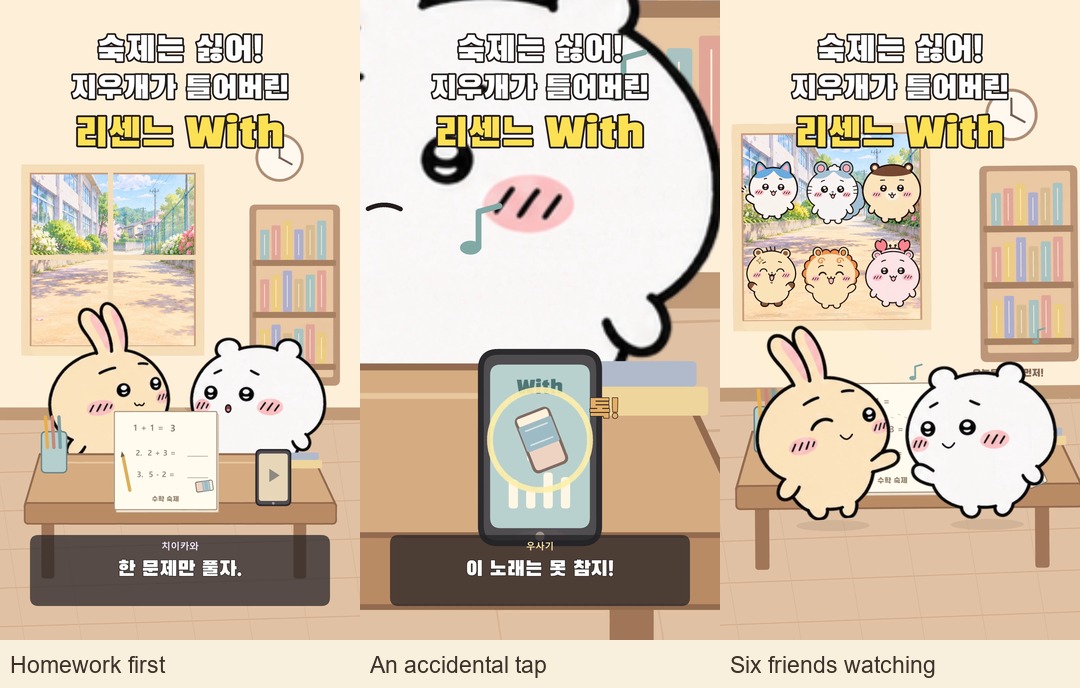
Watch episode 2 on YouTube → Pay attention to the phone at 10.5 seconds, then to the window as the friends arrive. If you missed the first episode, the earlier AniCraft making-of explains the original character-cel workflow.
Project setup: a small room with a readable chain reaction
| Item | Episode 2 |
|---|---|
| Software | ArtCraft AniCraft on Windows; installed companion CLI version 0.2.1 |
| Working file | Saved .anicraft document, final window-friends revision v3 |
| Output | 1080 × 1920 · 60 fps · 23.5 seconds · 1,410 frames |
| Main characters | The original approved Usagi and Chiikawa cel atlas from episode 1 |
| Additional cast | Six separately prepared 2D atlases, with four poses each |
| Sound transition | Phone contact and music start at 10.5 seconds |
| Production method | Python-assisted scene construction and animation in AniCraft, its CLI renderer, and an imported stereo sound mix |
The room, desk, worksheet, phone, and eraser are editable 2D shapes. The view through the window reuses the painted school lane from episode 1. That keeps a visual connection between the two episodes while giving the second story a different setting. The title and Korean captions are part of the vertical composition, separate from the moving scene.
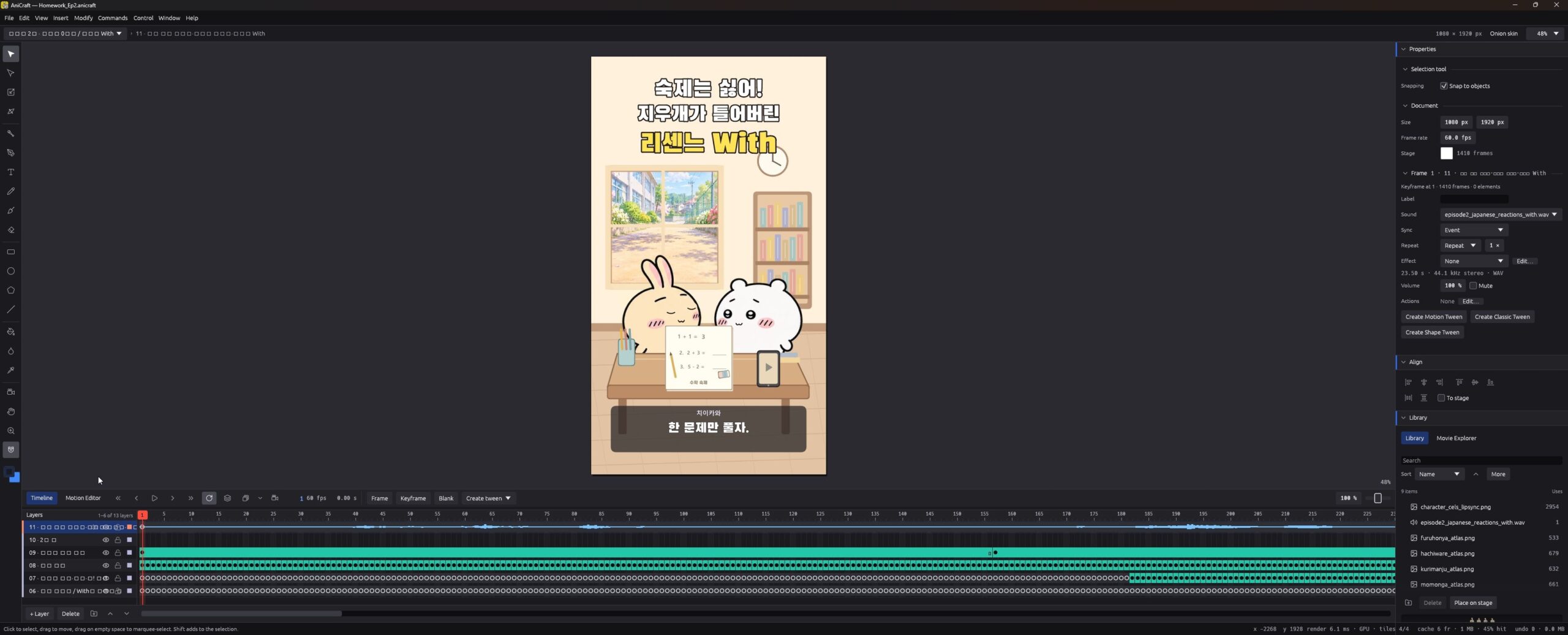
Build the gag around an event the audience can predict
I moved away from the earlier paper-tearing idea and gave the eraser a destination. Showing the phone in the opening creates a useful visual promise: once the eraser starts moving toward it, the viewer has something specific to anticipate. The scene can slow down briefly because the question has become “Will it hit play?”
| Time | Action | Purpose of the shot |
|---|---|---|
| 0–2.6 s | The two friends attempt one homework problem | Establish the desk, wrong answer, eraser, and phone |
| 2.6–4.82 s | Usagi rubs out the wrong answer | Show the short hand and eraser together in a close-up |
| 4.82–6.55 s | The eraser slips and makes two desk bounces | Make its escape and direction easy to follow |
| 6.55–10.5 s | A stretched final flight approaches the phone | Build anticipation and move into a play-button close-up |
| 10.5–11.38 s | Contact, playback change, and the pullback | Make the sound transition feel caused by the eraser |
| 12–15.3 s | Six friends appear outside in sequence | Reveal a growing audience while the leads dance |
| 21.2–23.5 s | “Problems solved… zero.” | Return to the homework joke and close episode 2 |
Fix the erasing shot without lengthening Usagi’s arm
The erasing action needed a closer view. At the wide scale, the paw, eraser, and worksheet competed with the round body, making the contact difficult to read. The final construction uses the existing short-hand pixels from the approved cel, with the hand shown in front of the worksheet and the eraser following the same character transform.
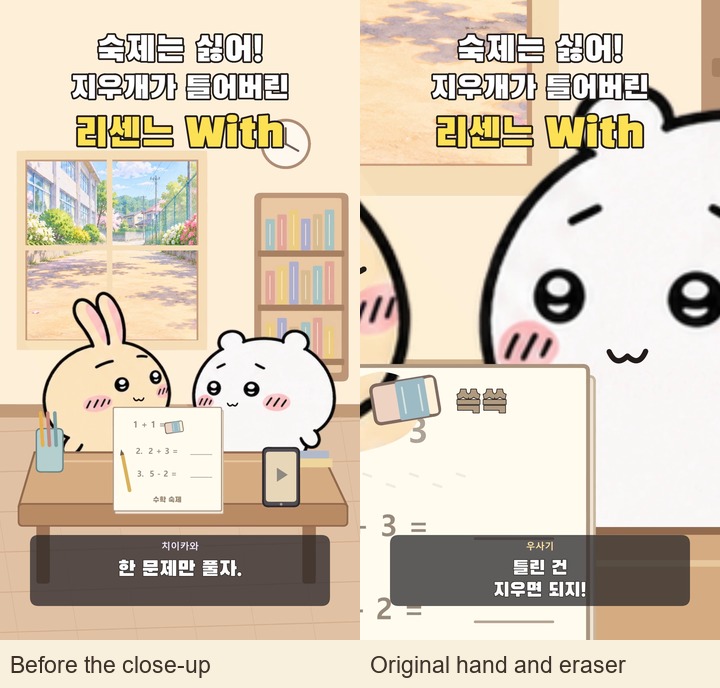
During this action, Usagi moves a short distance side to side. The eraser’s held position is calculated from that same cel transform, so it travels with the hand. The wrong answer is progressively covered with a paper-colored patch, with small eraser crumbs nearby. This is a staged 2D erasing effect, and it works best when the framing concentrates on the contact.
The close-up also keeps the shoulder seam outside the shot. That is a practical limit of using a small set of prepared cels: choose coverage that supports the drawing. I kept the original round faces and tiny limbs, and changed the shot around the action.
Animate the eraser toward one exact contact point
The flight is divided into three curved segments. The first leaves the held position and reaches the desk; the second produces another bounce; the last arcs toward the phone. Each segment uses a quadratic curve for position and an accompanying rotation. The shadows become smaller and lighter as the eraser rises, helping connect it to the desk below.
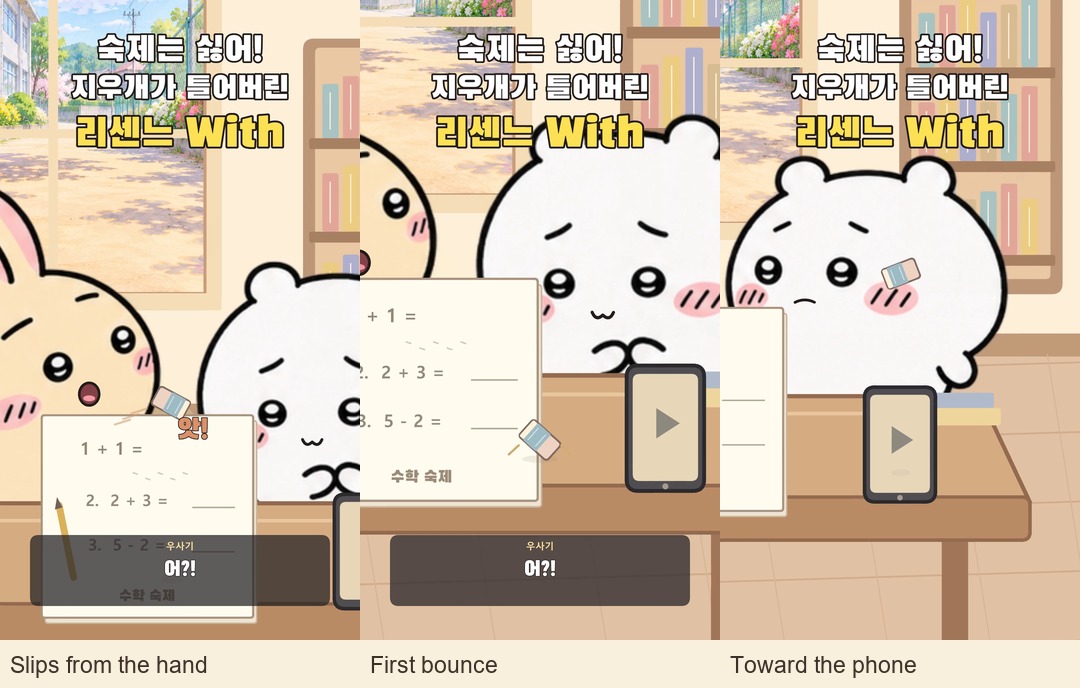
The final target is the phone’s play-button position in the scene: x = 815, y = 1348, reached at 10.5 seconds. These are scene coordinates before the apparent camera transform. Keeping the target in scene space means the eraser, phone, and impact mark remain aligned while the framing moves.
I treated the timing as stylized slow motion. It is a comic pause built from a curved path and a longer interval, rather than a rigid-body physics simulation. The important test is whether the previous and following frames still explain where the eraser is going.
Let the camera explain why the music starts
The framing first moves toward the erasing hand, opens up after the slip, follows the bounces, and then settles on the play button. In this AniCraft 2D animation, the apparent camera movement comes from scaling, translating, and slightly rotating the scene elements. The room uses a reduced version of the foreground transform to give the shot some depth.
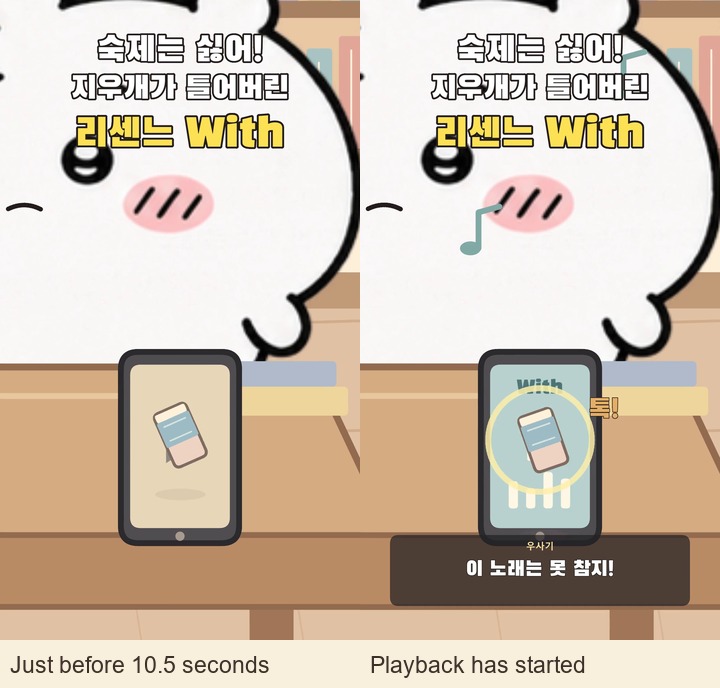
At exactly 10.5 seconds, four cues agree: the eraser reaches the button, a brief contact ring appears, the phone changes to its playing state, and the soundtrack starts “With.” The phone display gains a track label and animated bars. The view holds the close-up briefly, then pulls back so the dancing characters become the focus.
That alignment makes the accident legible even on a small screen. A useful check is to watch the few frames around contact without sound, then listen across the same point. The visual cause and the audible result should identify the same event.
Bring six friends to the window without crowding the dancers
The supporting cast consists of Hachiware, Momonga, Kurimanju, Rakko, Shisa, and Furuhonya. I prepared these as new 2D cel assets using AI-assisted image generation, referring to my existing 3D family models for character identity and the approved 2D lead artwork for proportions and line style. The two leads continue to use their original atlas.
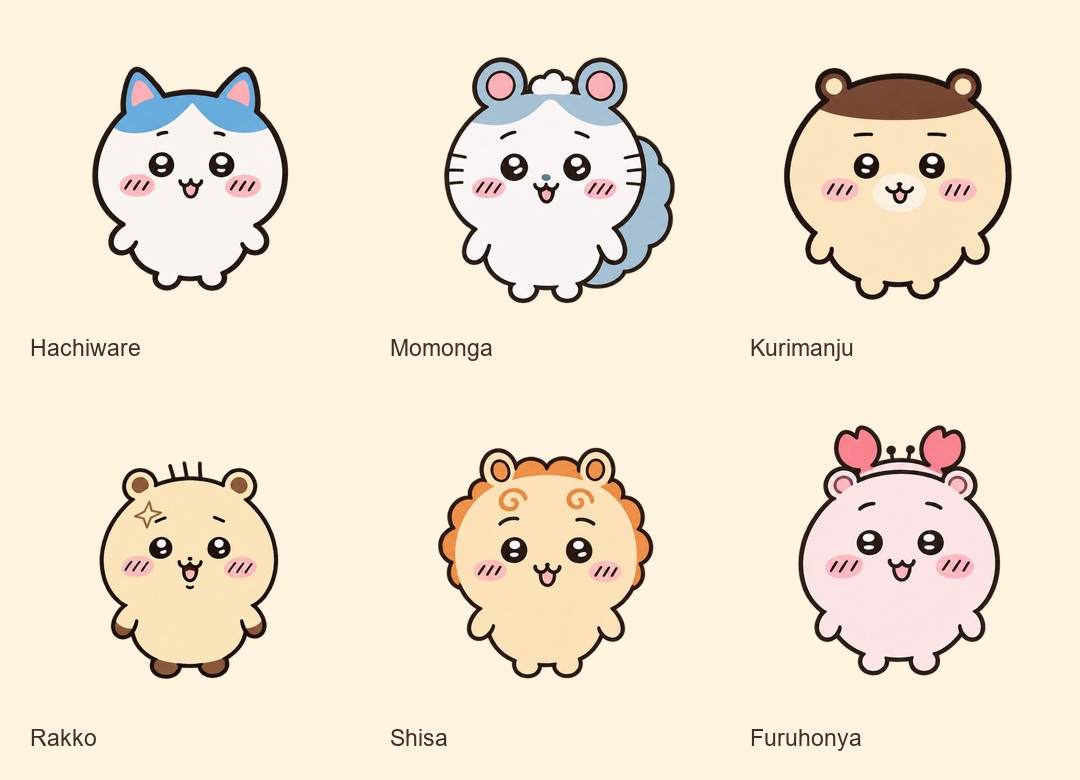
The friends begin arriving at 12.00, 12.48, 12.96, 13.44, 13.92, and 14.40 seconds. Each entrance takes about 0.85 seconds to settle. Their positions alternate between entering from the left and right, then form two rows of three. Pose changes let them peek, wave, and react while Usagi and Chiikawa keep dancing indoors.
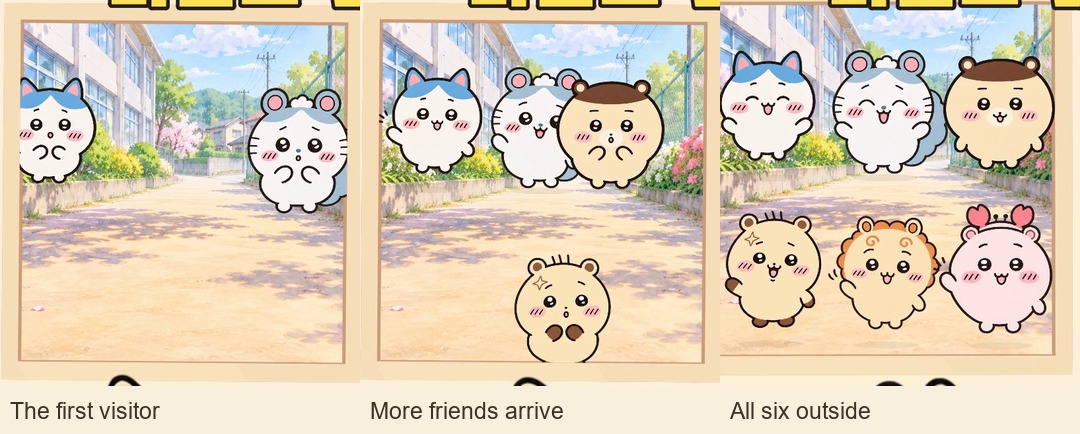
The window is also a compositing boundary. I clip the visible part of each friend bitmap to the opening, then draw the outer window frame in front. During the reveal, the two internal rails slide aside so they no longer cross the visitors’ faces. The original school-lane image stays behind them, keeping the gathering outside the room.
This layering matters: without clipping, an entering friend could slide over the interior wall. Without the foreground window frame, the visitors could look like stickers floating inside the room. A small amount of movement after arrival keeps them alive without competing with the main dance.
Keep the sound, captions, and final joke consistent
The music comes from the official RESCENE “With” music video, using approximately 2:05.383–2:18.383 in the source. It plays from 10.5 to 23.5 seconds in this Short. The rubbing, bounce, and button-contact sounds were constructed for the scene and placed against the same action times.
Short Japanese reaction recordings come from the official Mezamashi TV Chiikawa episodes linked here and here. Their amplitude drives simple mouth activity. The Korean story captions are my invented situation dialogue; they are not transcripts or literal translations of those recordings.
I changed the middle reaction to “그냥 춤이나 추자…”—“Let’s just dance…”—to keep the joke with the characters. The large top title includes RESCENE and “With,” and the final line brings us back to the forgotten worksheet: “푼 문제는… 0개.” The episode-end card appears near the top-right while the dancing continues.
What episode 2 taught me about a short animation
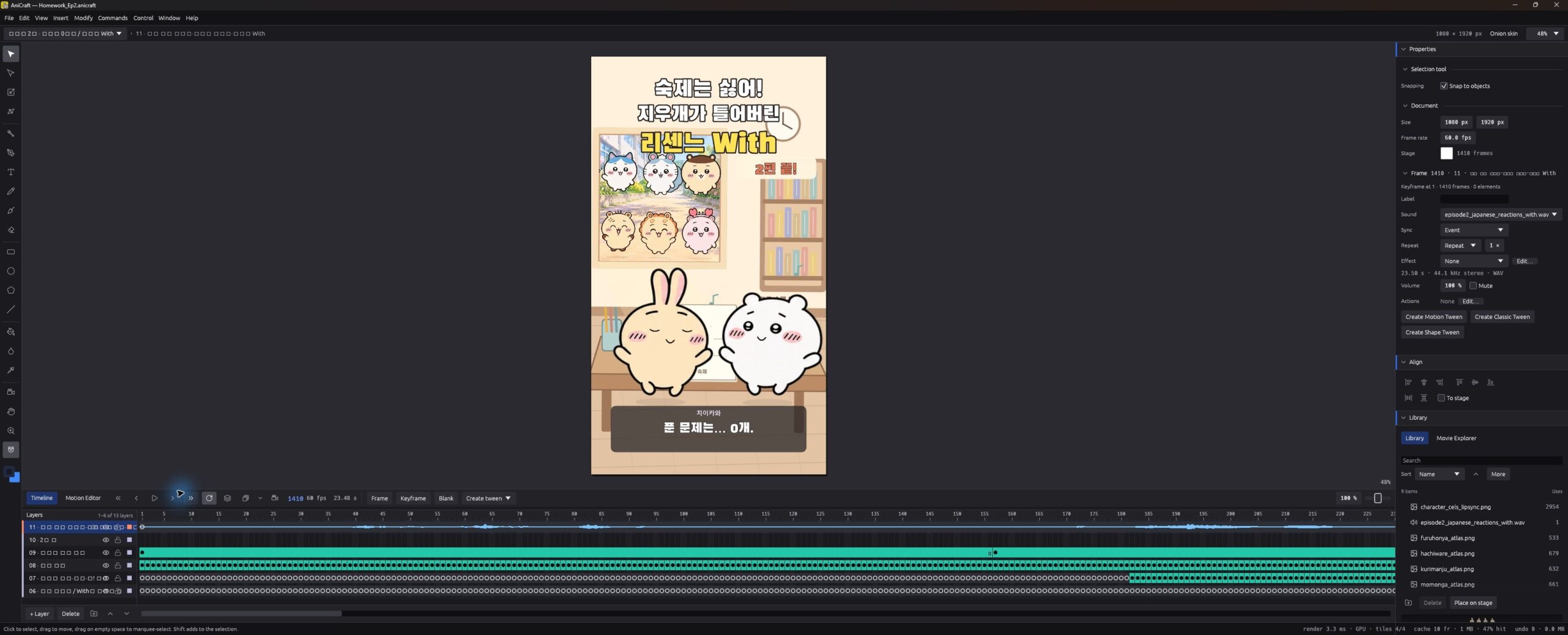
Episode 1 focused on an invitation and a dance. Episode 2 needed a visible cause, a reaction, and a second reveal. AniCraft’s layers and command-driven construction let me keep those parts separate: worksheet, hand, eraser, phone, room, foreground dancers, and sound could be checked against one another. The tradeoff is a dense timeline of generated frame poses, so the production script is the easier place to change the timing of the whole sequence.
The saved final checks record a fully decoded 1,410-frame video, unchanged lead artwork, six window friends, and a music transition at 10.5 seconds. All six reusable supporting-character projects were also rendered for verification. The most useful visual checks were more immediate: does the eraser meet the paw, does it meet play, do the visitors stay outside, and can the faces and captions still be read?
Watch the finished homework dance Short on YouTube → The phone contact and the growing window audience are the two moments this breakdown is built around. Continue with the episode 1 production diary, or compare the flat-scene approach with my earlier Blender making-of.
Credits: original Chiikawa characters: Nagano / ちいかわ. Music: RESCENE “With,” linked above. Japanese reaction recordings: the official Mezamashi TV Chiikawa episodes linked above. AniCraft is developed by the ArtCraft team; see the official app page and source repository. This is an unofficial fan animation and a production diary of my own adaptation. Editor screenshots show the saved production file reopened for this article. Other panels show finished-video frames or prepared character assets; the six supporting-character atlases were AI-assisted assets, not hand-drawn inside AniCraft.
Discussion