Modeling Lab
AniCraft 2D Animation Review: Making a Usagi After-School Short
For my first AniCraft 2D animation, I wanted to turn a small after-school story into a YouTube Short: Usagi and Chiikawa walking home from school, hesitating over an invitation, then dancing together. The finished episode is 25.5 seconds long. Its most important production decision was keeping the round faces and tiny limbs that made the first drawings appealing.
I used AniCraft, the 2D animation app from ArtCraft, with prepared character artwork, a school-lane background, Python-assisted animation construction, and its command-line renderer. This is a hands-on account of that specific project, including the choices that worked and the limits I had to work around—not a claim that the editor generated the whole Short from a prompt.
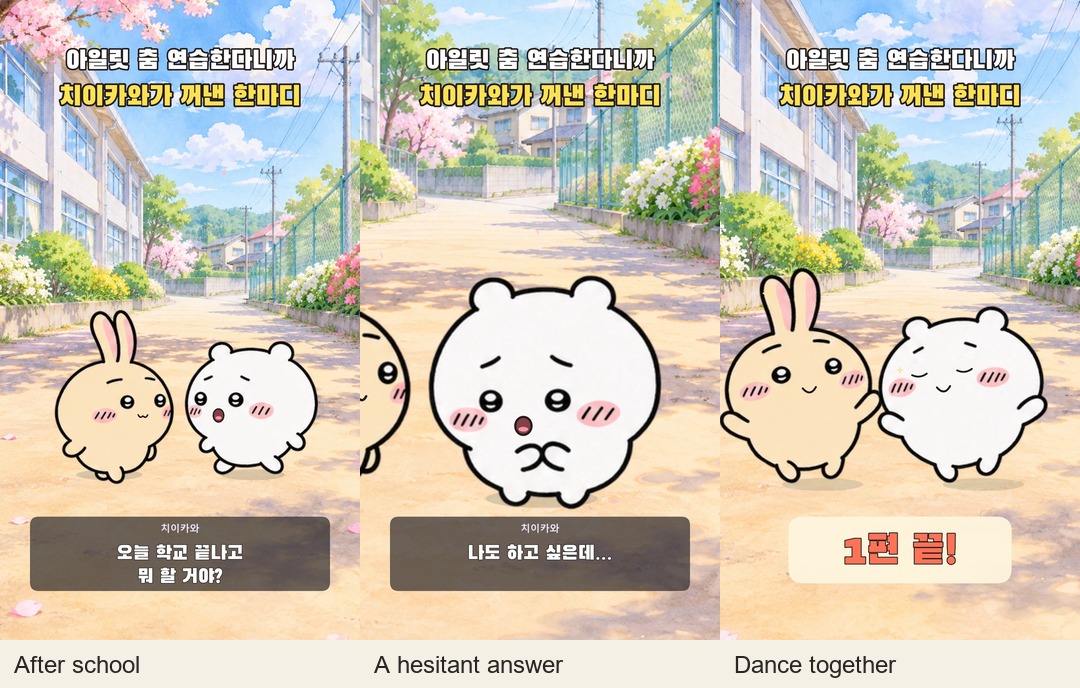
Watch my finished after-school episode on YouTube → Listen for the change from short reactions to music at 16.5 seconds, and watch how the framing moves closer without changing the character designs.
Project setup: what AniCraft handled
| Item | This project |
|---|---|
| App/build checked | AniCraft on Windows; the installed companion CLI reports 0.2.1 |
| Working document | Saved .anicraft project, final production revision v6 |
| Artwork | One approved 4 × 4 character-cel atlas plus a school-lane bitmap |
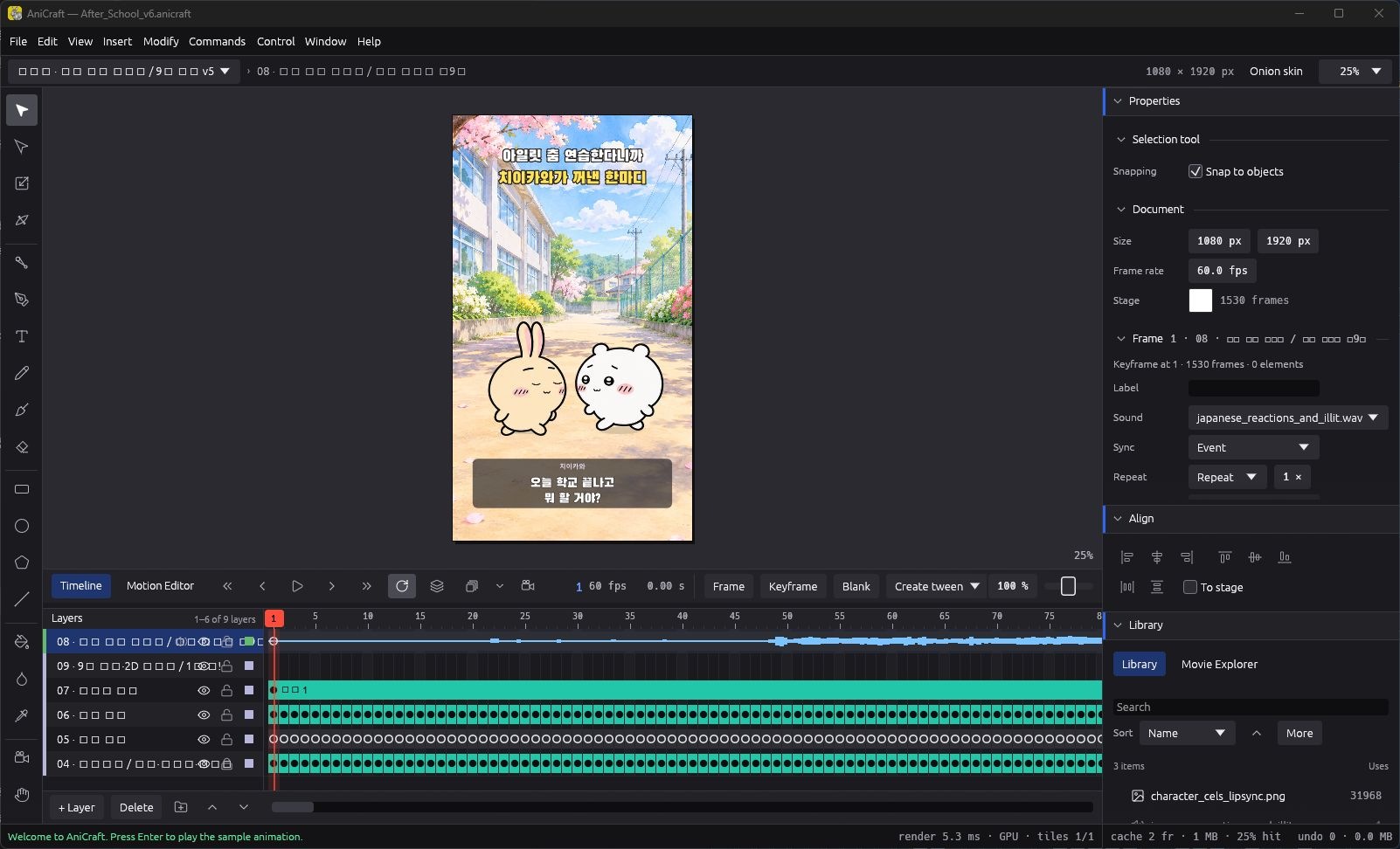
| Animation and assembly | AniCraft timeline and layers, scripted frame construction, bitmap transforms, vector overlays, and an imported audio mix |
| Finished output | 1080 × 1920 · 60 fps · 25.5 seconds · 1,530 frames |
| Sound | Short Japanese original-animation reaction excerpts, followed by nine seconds of ILLIT’s “You’re Under Arrest” |
The artwork was prepared before the final animation pass. AniCraft assembled and animated those assets; it was not where I redrew every character pose. The dialogue captions, title, reaction marks, and scene elements were built into the timeline alongside the imported images. In this build, the title lettering was converted to vector outlines by the production script, which kept the exported Korean text independent of a viewer’s installed fonts.
Give the conversation a reason to become a dance
The first sixteen and a half seconds are an invitation, not a music-video montage. Chiikawa asks about after-school plans. Usagi wants to practice an ILLIT dance. Chiikawa hesitates, admits an interest, and gets invited along. That makes the last nine seconds a small payoff: the two have become dance partners.
| Time | Story beat | What I wanted the viewer to notice |
|---|---|---|
| 0–5.65 s | After-school question and Usagi’s plan | Establish both friends and the reason for the music |
| 5.65–12.55 s | “And you?” followed by hesitation | Leave room for a pause, a glance, and a closer reaction |
| 12.55–16.5 s | The invitation and happy response | Bring attention back to the pair |
| 16.5–25.5 s | Nine-second dance and episode ending | Pay off the invitation and finish with a gentle approach |
Writing these beats first gave each camera change a purpose. A pause needed a held expression and space to read the caption. The invitation needed the other character back in the conversation. Simply adding more motion everywhere would have weakened those differences.
The most useful correction: keep the original face and short limbs
One revision made the characters less appealing by changing their faces and giving them longer-looking limbs. I rejected that direction and returned to the approved original cel sheet. The final version uses the same character bitmap as the earlier approved artwork; the final checks compare the embedded image with that source rather than relying on a similar-looking replacement.
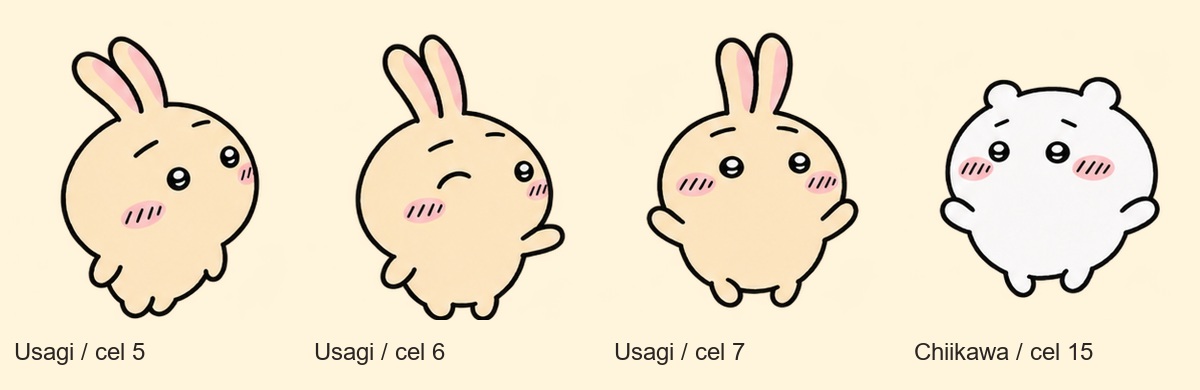
That changed the animation goal. I stopped trying to transfer every human joint movement literally. Instead, the dance alternates existing complete poses, adds a restrained body tilt and movement, and makes a very small adjustment around an existing foot. The face artwork is not stretched. The recorded maximum foot lift is three pixels in the source cel, before the scene transform.
This is a limited 2D adaptation of the reference, not a full skeletal recreation of the choreography. It has fewer possible poses, but the silhouette stays recognizably consistent. For this particular Short, that tradeoff was worth making.
Camera movement in a flat scene still needs an acting beat
The apparent camera move is implemented by transforming the 2D scene elements: scale, translation, and occasional slight rotation. There is no newly modeled 3D school lane behind the characters. The approach works within the available image area, so I checked the frame edges and the position of both faces as the view tightened.
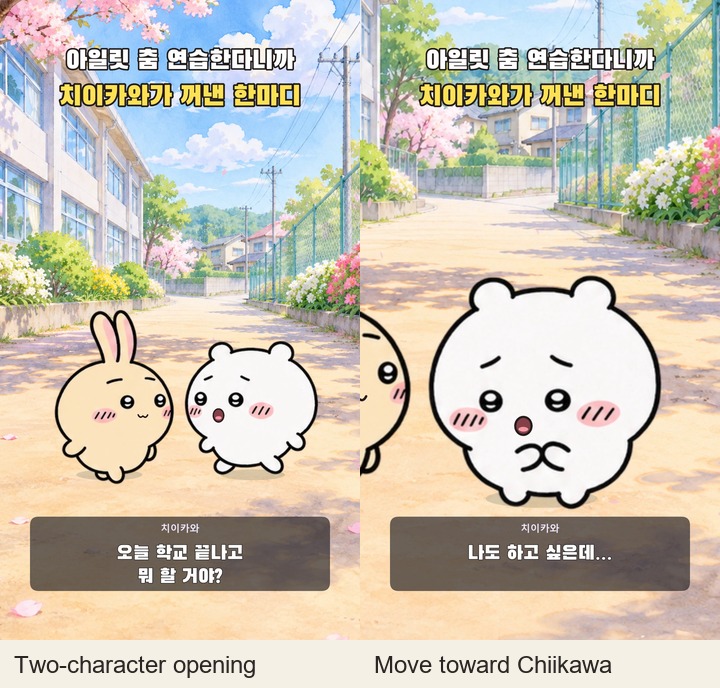
During the conversation, the framing shifts toward whoever owns the reaction. The dance includes closer accents and returns to a wider pair composition, then ends on a gradual approach. The final correction also reduced the ending magnification from the preceding version. A closer shot is only useful while the faces, ears, and intended action remain readable.
Japanese reactions, Korean story captions, and the music transition
The final sound uses brief Japanese reaction excerpts from the official Mezamashi TV Chiikawa animation and a second official episode. These are original recordings, not a cloned voice speaking the Korean script. Earlier experiments used synthesized speech; that is not the voice track in the final version described here.
The Korean captions tell my invented after-school story. They are not a literal translation or transcript of the Japanese excerpts. I treated the recordings as short emotional reactions, placed them within the dialogue slots, and used their amplitude to drive simple mouth activity. That produces a reaction rhythm rather than phoneme-accurate dialogue animation.
At 16.5 seconds, the soundtrack switches to the selected nine-second ILLIT segment. The dance reference was my earlier choreography Short, based on STUDIO CHOOM’s “You’re Under Arrest” performance. I reused the reviewed sound mix for the final character correction, so restoring the drawings did not introduce another audio edit.
Make the Short readable on a phone
The frame has three jobs: a clear title at the top, character acting in the middle, and short Korean captions below the main facial action. I enlarged the title during revision and checked it with the complete vertical composition. The caption panel uses a dark translucent background so the pale school lane does not wash out the lettering.
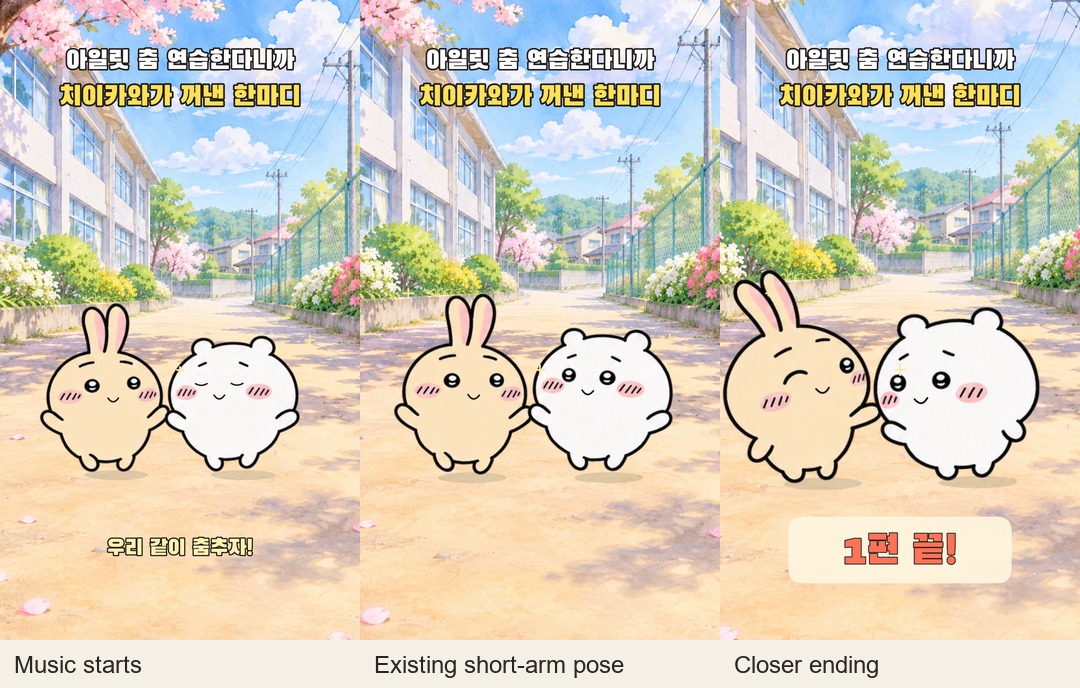
For the ending, I kept the message short: “1편 끝!” The card appears over the ongoing scene rather than introducing another location. This leaves the episode feeling like a small completed story and gives a future episode somewhere to continue.
What I liked—and what this workflow still asks you to do
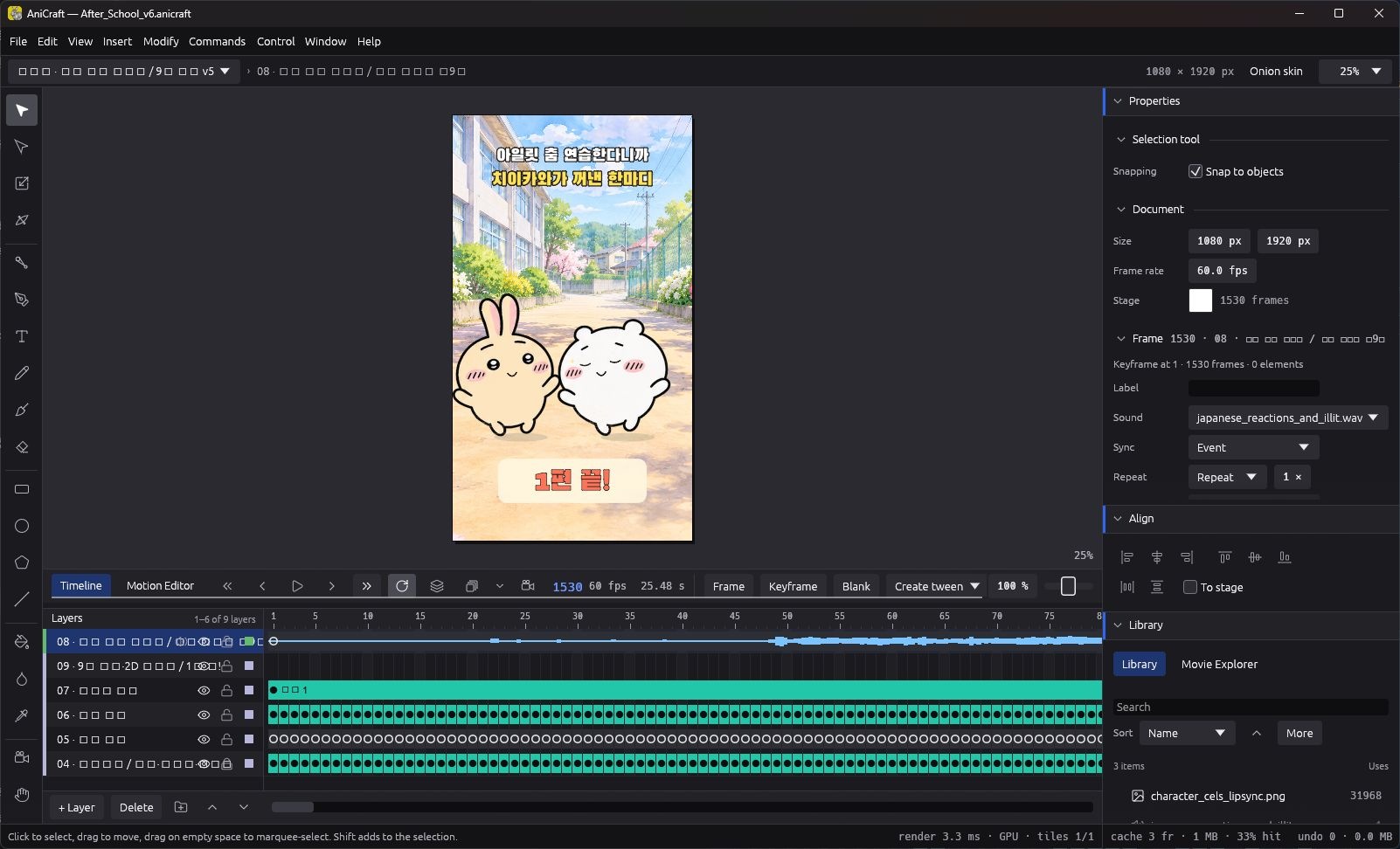
AniCraft was useful here because the scene remained inspectable as layers, frames, bitmaps, and sound in one saved document. Its CLI let the scripts construct and render repeatable changes, while reopening that document in the editor made the actual result visible. The official project also describes a timeline-and-command-based workflow; this production used that approach rather than a click-only editing session.
The limitations were practical. The dense frame-by-frame timeline is less convenient to revise manually than a small set of reusable motion spans. A bitmap cel sheet limits the available acting, and pushing a pose too far can damage the drawing. The local editor also showed incomplete Korean glyph coverage in some interface labels. Those observations are about this installed build and this project, not a benchmark of every AniCraft feature.
My strongest lesson was to test one conversation beat and a short dance before extending the episode. Check a blink, one reaction, a change of pose, and the closest framing. If those preserve the character’s appeal, the longer sequence has a much firmer foundation.
Check the export, then watch the episode in motion
The final video was fully decoded during verification: 1,530 frames at 60 fps, 1080 × 1920, with the original character bitmap retained. I also reviewed the conversation, transition into the nine-second music segment, captions, and ending framing. Exporting at 60 fps alone does not make a limited set of cels feel fluid; that still depends on the chosen poses, movement, and timing.
Watch the finished Usagi and Chiikawa after-school Short → The hesitation and the first dance pose are the best places to see these decisions in motion. For the earlier 3D approach, read my Blender making-of. Both projects use the same basic rule: adapt the action to the character, then use the framing to make it clear.
Continue with episode 2: the homework dance
In the next episode, an eraser slips onto a phone’s play button, RESCENE’s With starts, and six friends gather at the window. Read the episode 2 making-of: the eraser, phone close-up, and window visitors → It follows the contact timing, 2D framing, and staggered entrances in the finished homework Short.
Credits: original Chiikawa characters: Nagano / ちいかわ. Music and choreography reference: ILLIT / STUDIO CHOOM, linked above. Japanese reaction recordings: Mezamashi TV’s official Chiikawa episodes, linked above. This is an unofficial fan animation and a production diary of my own adaptation, not an official collaboration with the character, music, or software creators. Editor screenshots were captured by reopening the saved production document for this article; comparison panels use source artwork or frames from the completed export.
Discussion