Code Lab
Arcane Explained: Manage Docker Containers Through a Visual Dashboard
CODE LAB · PROJECT SPOTLIGHT
Arcane Go / Svelte · BSD-3-Clause
Read container status and understand the operations behind a Docker dashboard.
Repository preview/artwork: getarcaneapp/arcane · creator-supplied image.
Arcane is a visual management interface for Docker environments. It puts container state, projects and administrative actions in a dashboard, while the underlying work still runs through the container runtime.
That is useful when you want to inspect a small server without remembering every command. It also makes scope important: a dashboard that can start or stop a container is an operating interface, not merely a passive status page.
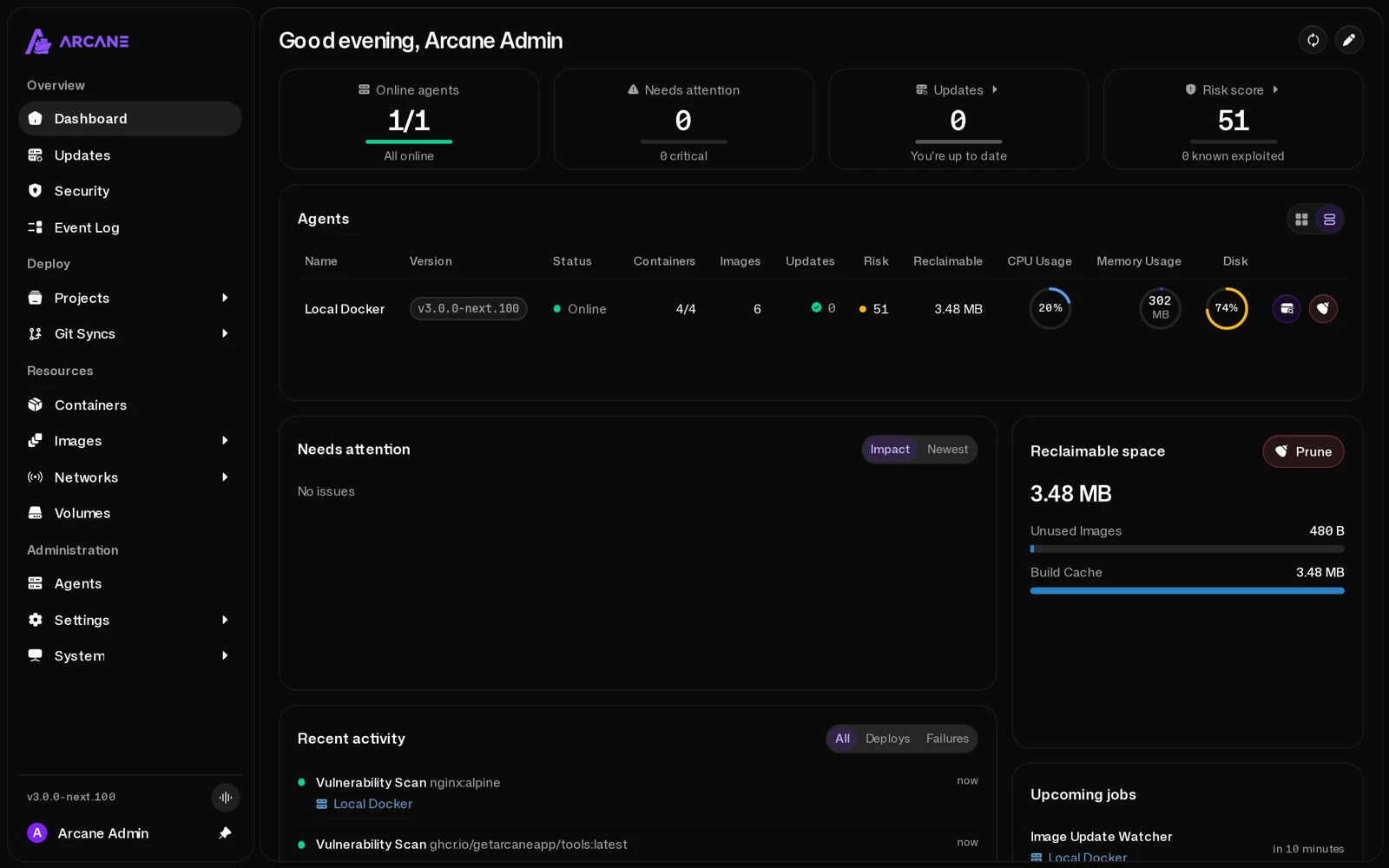
Read the dashboard before acting
Start by confirming which environment you selected and which container or Compose project you are inspecting. A running process, a healthy application and a reachable public website are related but different observations. Logs, health checks and the actual endpoint help you distinguish them.
| You see… | It helps answer… | It does not establish… |
|---|---|---|
| Container state | Is this runtime object running, stopped or restarting? | Whether the application serves correct responses. |
| Resource information | What load is visible for the selected environment? | The cause of every slowdown. |
| Logs and activity | What happened around a failure or management action? | That every error has been resolved. |
| An update or image action | Which deployment operation is available? | That a newer image is compatible with your data. |
For a first evaluation, use a disposable container in a separate local environment. Compare its state before and after one controlled action and check the logs. That keeps the demonstration understandable without changing a live application.
Follow the v3 setup route
The repository’s current main branch identifies itself as v3 and links a separate release/2.x.x branch for the older series. We observed v3.0.1 on the official Releases page, dated November 15. Check the matching documentation before migrating an existing installation; this article is an introduction, not a migration completion report.
The official installation guide ↗ uses Docker Engine and Docker Compose. Its Compose route has you generate an encryption key, create a configuration, mount persistent application data and a projects directory, then start the manager.
| Configuration item | Purpose | Common setup check |
|---|---|---|
| ARCANE_APP_URL | The address used to open the interface | Match the URL you actually use, including a reverse proxy when applicable. |
| ARCANE_ENCRYPTION_KEY | Encryption key required by the configuration | Generate and retain your own key; do not reuse a public example. |
| arcane-data | Persistent application database and state | Keep the volume when recreating the manager. |
| ARCANE_PROJECTS_DIRECTORY and its mount | The Compose projects Arcane can manage | Ensure host and container paths follow the documented mapping. |
| Docker connection | Access to the runtime being managed | Understand the scope of a socket mount or the documented proxy route. |
After preparing the documented configuration, the start command is:
docker compose up -dThe guide uses port 3552 and a first-start administrator password generated into the application’s data directory. Follow the current instructions to retrieve it and set your own password. We did not deploy the manager or sign in to a local instance for this article.
The runtime connection matters more than the color of the interface
The default installation example connects to Docker through its socket. That connection enables real management operations. The documentation also offers a socket-proxy route to restrict access. Pick the appropriate documented deployment for the host instead of exposing an administrative dashboard as though it were a public read-only report.
For Compose projects, path mapping affects how relative mounts resolve. A project appearing in the interface does not prove its mounted configuration files point to the intended host directory. Check that mapping before recreating an existing workload.
Inside the source: a Start action reaches the runtime
The Go service makes the boundary concrete. This is the inspected StartContainer implementation:
The method passes the operation name and event type into a shared lifecycle-action wrapper. Its callback first checks whether a Podman systemd unit path handled the action. Otherwise, it calls the Docker client’s ContainerStart for the selected container ID and returns the error result.
This short function is not a complete authorization or rollback audit. It shows why the button represents a runtime operation, and why checking the selected environment and container is meaningful. The wrapper and the surrounding service code provide context beyond the excerpt.
Actual source: getarcaneapp/arcane at the linked inspected commit. BSD-3-Clause; original line numbers and syntax coloring added. This code snapshot is pinned independently of the release link.
Source credit and BSD-3-Clause license notice
BSD 3-Clause License

Copyright (c) 2025, Kyle Mendell

Redistribution and use in source and binary forms, with or without
modification, are permitted provided that the following conditions are met:

1. Redistributions of source code must retain the above copyright notice, this
   list of conditions and the following disclaimer.

2. Redistributions in binary form must reproduce the above copyright notice,
   this list of conditions and the following disclaimer in the documentation
   and/or other materials provided with the distribution.

3. Neither the name of the copyright holder nor the names of its
   contributors may be used to endorse or promote products derived from
   this software without specific prior written permission.

THIS SOFTWARE IS PROVIDED BY THE COPYRIGHT HOLDERS AND CONTRIBUTORS "AS IS"
AND ANY EXPRESS OR IMPLIED WARRANTIES, INCLUDING, BUT NOT LIMITED TO, THE
IMPLIED WARRANTIES OF MERCHANTABILITY AND FITNESS FOR A PARTICULAR PURPOSE ARE
DISCLAIMED. IN NO EVENT SHALL THE COPYRIGHT HOLDER OR CONTRIBUTORS BE LIABLE
FOR ANY DIRECT, INDIRECT, INCIDENTAL, SPECIAL, EXEMPLARY, OR CONSEQUENTIAL
DAMAGES (INCLUDING, BUT NOT LIMITED TO, PROCUREMENT OF SUBSTITUTE GOODS OR
SERVICES; LOSS OF USE, DATA, OR PROFITS; OR BUSINESS INTERRUPTION) HOWEVER
CAUSED AND ON ANY THEORY OF LIABILITY, WHETHER IN CONTRACT, STRICT LIABILITY,
OR TORT (INCLUDING NEGLIGENCE OR OTHERWISE) ARISING IN ANY WAY OUT OF THE USE
OF THIS SOFTWARE, EVEN IF ADVISED OF THE POSSIBILITY OF SUCH DAMAGE.
Where Arcane fits in a small self-hosted setup
It can make repeated inspection and routine management easier to see: find a project, inspect a container, check activity and perform a specific action. It does not remove the need to understand Docker volumes, image versions or application-level backups.
Before changing an image, record the current version and how its data is stored. Before deleting a volume, understand what data lives in it. A clear interface can make an operation easier to initiate; it cannot decide whether that operation is appropriate for your application.
Availability and what we did not test
Arcane’s public repository uses BSD-3-Clause. Hosting, storage and the applications you manage remain separate costs. Check the official releases and matching installation guide for supported architectures and current configuration details; do not assume every Docker host is interchangeable.
We verified the repository, official v3 dashboard image, release listing, installation guide and pinned lifecycle function. We did not install Docker, connect Arcane to this site’s hosting or run lifecycle operations. The screenshots are upstream examples, and the setup discussion describes the documented route.
Use the repository ↗, official releases ↗ and documentation ↗ together when planning a deployment.
Reviewed November 17, 2026. Discovery lead: Mindung’s Short ↗. We read the video description and independently inspected the linked repository; we did not watch or obtain a nonempty transcript of the Short. Documentation/source inspection only; no live container management test is claimed. Creator images remain their published examples; no hosted or embedded video playback is included.