AI Technical Articles
ChatGPT Wallet: Approval, Tokens and Order Confirmation
If an AI agent handles checkout for you, biometric approval does not prove that the purchase itself is safe or correct. It provides an authorization checkpoint: ChatGPT can prepare the transaction, but you review and approve it, while a payment token substitutes for the underlying card number and security code in checkout. OpenAI launched ChatGPT Wallet on November 13, 2026, with a gradual U.S. rollout through dots for eligible ChatGPT Pro users. See OpenAI’s launch announcement.
Those controls solve specific problems. They do not establish that ChatGPT selected the right product, that a seller is trustworthy, or that the merchant ultimately accepted the order.
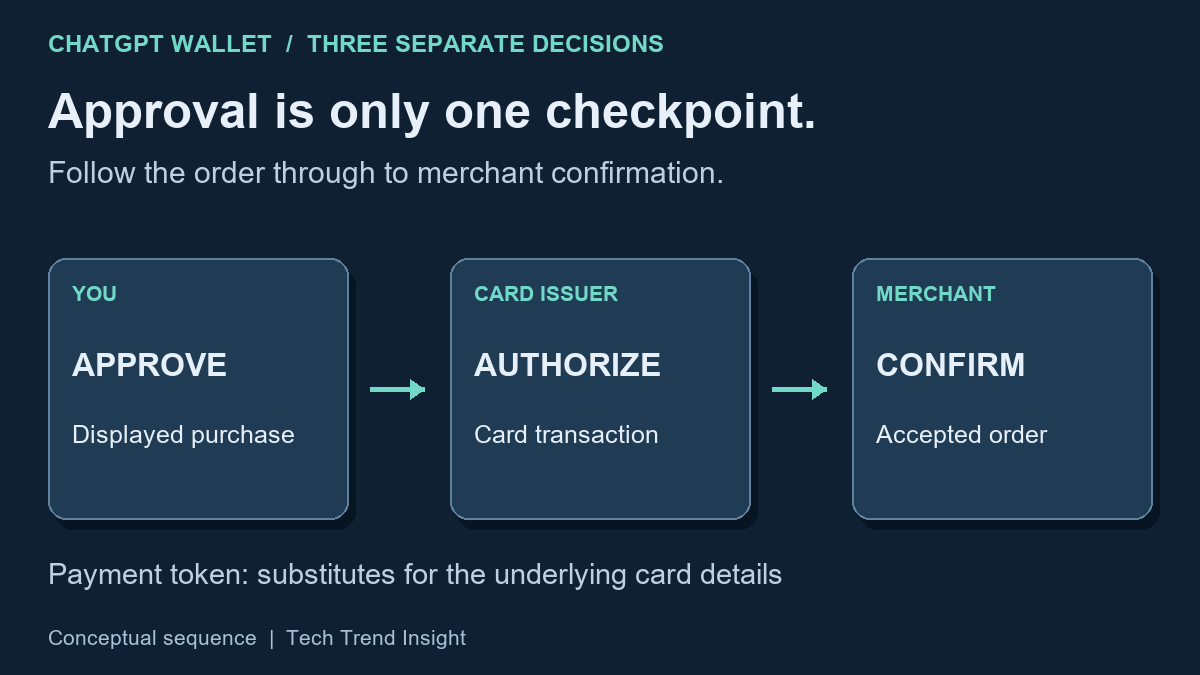
The practical lesson is to treat the biometric approval screen as the last consequential review before you authorize the purchase, not as a routine Face ID or fingerprint prompt.
How a ChatGPT Wallet purchase works
As checked November 15, 2026, OpenAI’s Help Center describes a gradual rollout to eligible U.S. ChatGPT Pro users aged 18 or older, with an eligible U.S.-issued credit card, U.S. billing address and supported biometric device. Wallet works with a dot, the personal agent in ChatGPT; it is not available in ordinary Chat, Work or standalone Codex threads. Debit and user-supplied virtual cards are not supported at launch. Check the current card-specific conditions before setup.
The purchase process separates several jobs that can easily look like one action:
- ChatGPT prepares the transaction. It can help find a product, prepare an order or fill out a merchant’s checkout.
- You review the transaction. Wallet may show details such as the merchant, items or services, quantity, total or maximum price, selected card, delivery information, and recurring-charge, deposit or authorization-hold terms.
- You authorize it. OpenAI currently requires a security check for each purchase, with biometric verification such as Face ID or Touch ID on supported devices.
- A substitute payment credential is used. After approval, a payment network or provider can supply a payment token or virtual credential linked to the selected card rather than exposing the actual card details to the business or agent.
- The issuer and merchant still make separate decisions. The card issuer decides whether to authorize the transaction, while the merchant decides whether to accept and fulfill the order. The Wallet Terms describe these roles explicitly.
What does a payment token protect?
Payment tokenization is not an AI-specific security technique.
The primary account number (PAN) is the card number associated with a payment account. EMVCo defines payment tokenization as replacing that sensitive number with an alternative value. An EMV payment token can also be constrained to a particular merchant, device or payment scenario, reducing the usefulness of compromised payment information outside its intended context. EMVCo explains payment tokenisation. These are general tokenisation properties; the Wallet documentation does not establish that every Wallet credential has every possible restriction.
That benefit is important but narrow: tokenization primarily reduces payment-credential exposure risk.
In ChatGPT Wallet, OpenAI says the payment used at checkout can be a virtual card number linked to the selected card rather than the number printed on the physical card. Its privacy notice says OpenAI receives a tokenized payment credential and limited card details, such as the network, issuer, card type and last four digits, while the full credit card number and security code are collected through a secure form by its service provider rather than received by OpenAI. The Wallet Privacy Notice describes this data handling.
Tokenization reduces exposure of the underlying payment credential; it does not make the purchase anonymous. The privacy notice also describes purchase, contact, delivery and device records. A seller still needs information to fulfill an order. Keep that separate from the narrower benefit of hiding the full card number.
What does biometric approval prove?
Biometric verification addresses a different problem: authorization.
Before purchase submission, Wallet presents transaction details for review and asks the user to approve. OpenAI also records information about Wallet activity including the purchase request, approved or rejected action, authentication result, time and device used. If a biometric check is performed locally by the device, OpenAI says it does not receive the underlying fingerprint or face scan.
The distinction is between:
“I authorized this displayed request.”
and:
“This purchase is correct and safe.”
Biometric authentication helps establish the first. It does not independently establish the second.
A fingerprint cannot determine whether a merchant’s description is misleading. Face ID cannot notice that an agent selected the wrong product variant. Neither decides whether a subscription represents good value.
The Wallet Terms say AI systems can make mistakes and limit approval to the displayed purchase details. They also say a material change before submission requires approval of the updated purchase.
What can still go wrong?
Three failure modes remain particularly important.
ChatGPT can prepare the wrong transaction
An AI agent can assist with product research and checkout without guaranteeing that every selection reflects the user’s intent.
Suppose, hypothetically, that you ask for one model of headphones but the prepared order contains a similar-looking variant. The payment token could work exactly as intended and biometric authentication could successfully confirm your approval, yet you would still have authorized the wrong product.
That is a transaction-review problem, not a payment-token problem.
The merchant remains responsible for the sale
The Wallet Terms identify the merchant as the seller and merchant of record—the business responsible for the sale. The transaction remains subject to the merchant’s terms, prices, privacy policy, shipping rules, return policy and other conditions. OpenAI also says a merchant’s appearance in ChatGPT does not imply OpenAI endorsement.
If an agent reports that approval succeeded but cannot confirm the order, ask it to stop retrying while you check the merchant’s receipt or order history. Repeating checkout during that uncertain state can create a second order.
One approval can lead to later recurring charges
OpenAI’s Help Center says a merchant may retain the credential and make later charges under an agreed recurring or continuous-payment plan.
That makes terms such as recurring charge, continuous payment, subscription, deposit and authorization hold especially important on the approval screen. Biometric approval of the initial transaction does not mean that every later charge under an agreed recurring-payment arrangement will receive a fresh biometric approval.
A worked example: the amount is not the only boundary
Consider a hypothetical request for one pair of Model A headphones: $90 for the item plus $8 shipping, a $98 total and no subscription. Verify the model and quantity as well as the amount. A $98 order for Model B is still the wrong purchase even though the price matches.
If the request says “maximum price $98,” that is a ceiling, not permission to add a recurring charge. If the prepared purchase changes materially—for example, a different model or a $102 total—review the updated request before approving. Those amounts are an example of reading a displayed request, not a Wallet fee schedule or an observed checkout.
What to check before approving
The most useful security habit is straightforward: read the approval request as a transaction, not merely as an authentication prompt.
Check:
- Merchant: Is this the seller you intended to use?
- Product or service: Verify the precise item, variant, quantity, recipient and delivery information shown.
- Amount: Check the displayed total or maximum price and any known tax, shipping, fees, deposits or authorization holds.
- Recurring terms: Look specifically for subscription, recurring or continuous-payment conditions.
- Payment data: Enter card numbers, security codes and bank verification codes only in the designated secure forms. OpenAI warns against sharing these credentials in chat or support messages.
After approval, wait for evidence that the merchant accepted the order. Biometric success establishes authorization, not order confirmation.
If you need a cancellation, refund or return, OpenAI directs you to the merchant. For declined, pending, disputed or unrecognized card charges, it directs you to the card issuer. Wallet errors, suspected unauthorized access to the ChatGPT account, or a purchase different from the one approved should also be reported to OpenAI Support.
Keep the three decisions separate
The user approves the displayed purchase, the issuer authorizes payment, and the merchant accepts and fulfills the order. A successful step is evidence for that step, not a substitute for the next one.
OpenAI’s launch announcement describes broader pre-approved delegation using limits or time periods as a future direction. The initial Help Center flow still calls for review and biometric approval of each purchase. Review the terms of any later feature rather than assuming the launch flow covers it.